Can't set background color to black
O.o weird... I tried this and everything seems ok https://jsfiddle.net/3bprucnv/2/
Read full answer below ↓Question
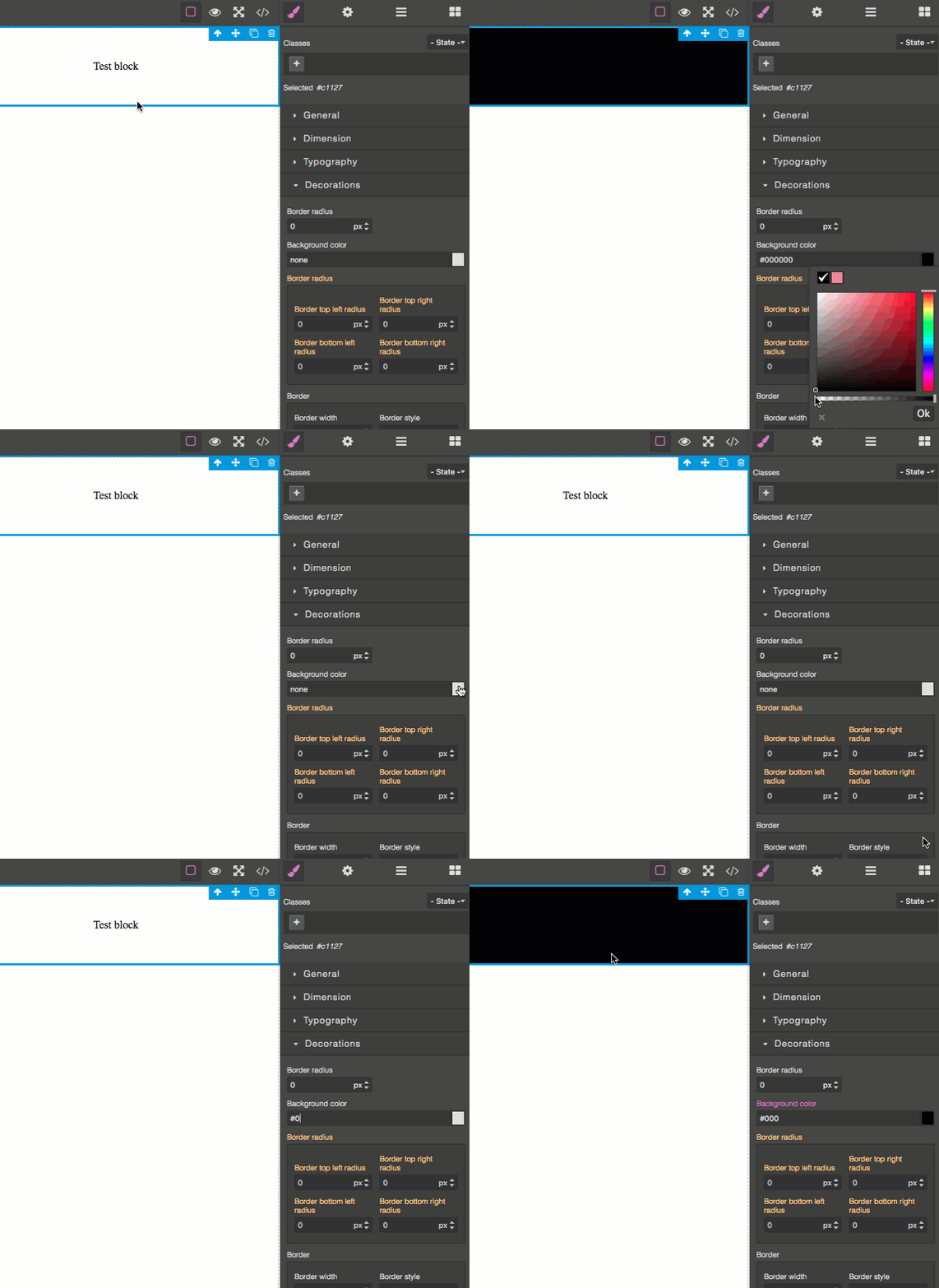
I can't set background color to black with spectrum color picker. Only work if I type hex value.
Thank you for great framework!
Answers (3)
O.o weird... I tried this and everything seems ok https://jsfiddle.net/3bprucnv/2/
You must drag new block (text for example) and change background color. It does not happen with blocks already there when you load the page. Same problem on your demo and code from Github but It's ok on your jsfiddle link (I tried to add new block to jsfiddle and it work well)
@hoainam12k I have the same problem, did you find fix?
Related Questions and Answers
Continue research with similar issue discussions.
Issue #2566
Color picker default colors
Is there a way to set a number of default colours to appear at the top of the color picker?
Issue #2748
Slider doesn't work with a non-integer step value
Default StyleManager property "slider" doesn't work with a non-integer step value. GrapesJS version: 0.16.1 In many cases, it’s convenient...
Issue #4006
Background color automatically changes to black
GrapesJS version [X] I confirm to use the latest version of GrapesJS What browser are you using? Chrome Reproducible demo link https://grap...
Issue #3389
MultiSelect some elements and change styles only work on the last selected element
Hi, when I MultiSelect some elements using shift, and change style in styleManager. Only the last clicked element will update the style. Ca...
Paid Plugins That Match This Issue
Curated by issue keywords and label relevance to help you ship faster.
Loading paid plugin recommendations...
Check the open-source GrapesJS plugins on GitHub or run a quick search in our free catalog.
Browse free plugins →Premium plugins ship with support, regular updates, and production-ready features — save days of integration work.
Browse premium plugins →Related tutorials
In-depth guides on the same topic.
Tutorial
PageKit: the GrapesJS application you'd have to build anyway
A source-available Next.js app around the open-source GrapesJS core — publishing, custom domains, leads, checkout and a plugin loader.
Tutorial
Claude Skill for GrapesJS: How AI Is Changing the Way We Build Visual Editors
We've released the Claude Skill for GrapesJS Development — a free, open-source skill that turns Claude into a developer who actually knows GrapesJS
Tutorial
Messaging on gjs.market: talk to a studio before you buy, not after
We've launched private messaging between buyers and studios. One thread per buyer–studio pair, the whole history in one place.
Browse Plugin Categories
Jump directly to plugin category pages on the marketplace.