Color picker default colors
Question
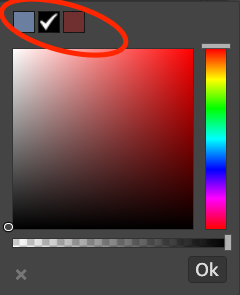
Is there a way to set a number of default colours to appear at the top of the color picker?
Answers (3)
grapesjs.init({
	...
	colorPicker: {
		palette: [
			['#000000','#ff0000','#ff8000','#ffff00','#008000','#0000ff','#4b0082']
      	],
	}
})
Thank you! This may sound stupid, but is this documented somewhere, as I didnt find it in the official docs
No, unfortunately not yet, the idea was to make the color picker replaceable, so I've planned to document it once the new API was ready
Related Questions and Answers
Continue research with similar issue discussions.
Issue #2364
How to add toolbar functionality to the layers panel.
I am trying to add the toolbar to the layers panel and I am not sure how to go about this. Is there any way to accomplish this? toolbar Whe...
Issue #1379
How to replace style-manager font-awesome icon into svg?
hi @artf i Want to replace an icon of style manager with svg icon . As you can see screenshot attached. I tried dat way.
Issue #3267
Cannot set 0px box shadow blur
For some reason, the editor does not allow to set the blur to 0px. 0 always magically turns into 5px. <img width="243" alt="Screenshot 2021...
Issue #3683
How to set the component cannot be deleted
Paid Plugins That Match This Issue
Curated by issue keywords and label relevance to help you ship faster.
Loading paid plugin recommendations...
Check the open-source GrapesJS plugins on GitHub or run a quick search in our free catalog.
Browse free plugins →Premium plugins ship with support, regular updates, and production-ready features — save days of integration work.
Browse premium plugins →Browse Plugin Categories
Jump directly to plugin category pages on the marketplace.