Tabs behaviour after HTML import
This is not related to the core but more to the Tab plugin which is not re-importable by default.
Read full answer below ↓Question
GrapesJS version
- I confirm to use the latest version of GrapesJS
What browser are you using?
Chrome 107 (MacOS)
Reproducible demo link
https://grapesjs.com/demo.html
Describe the bug
How to reproduce the bug?
- Drag and drop the Tabs block into the editor content
- Click on the "import" button on the top
- Change something in the html content (rename one of the previous tabs created for example)
- Click on "import"
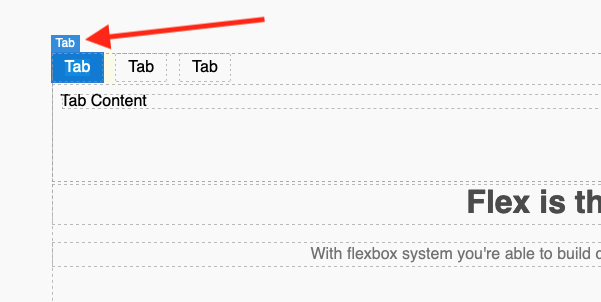
What is the expected behavior? The tabs have to be editable (add new tab and navigate between them) after html import
What is the current behavior? The tabs have not the "tab" type anymore and can't be edited
Before html import:
After html import:
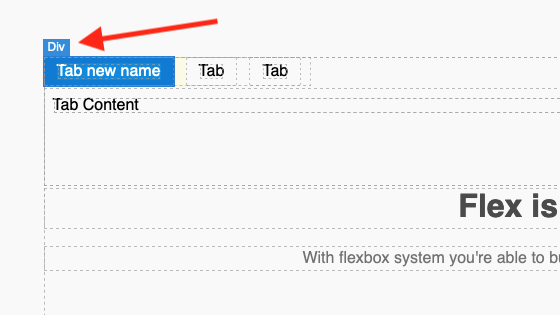
Thank you for your help!
Code of Conduct
- I agree to follow this project's Code of Conduct
Answers (4)
This is not related to the core but more to the Tab plugin which is not re-importable by default.
Hey! Thanks a lot for the answer. In fact, the issues seems to come from the reimport code & store manager, that does not update the JSON part of the code. Would you have a way to take a look? Or should we create the same ticket on the tab plugin branch and/or the re-import plugin branch?
It's related to the Tab plugin as once you print its HTML there is no way to reimport is back. You can actually extend the Tab component and add the isComponent method to allow the parser to identify the component.
Thanks for reporting this, @Rilvatore.
Great question about Tabs behaviour after HTML import. The recommended approach with GrapesJS is to use the event-driven API.
Start here:
- Check the GrapesJS documentation for your specific module
- Look for the
on()event listener method - Most operations can be achieved by listening to editor and component events
Common patterns:
// Listen for changes
editor.on('change', () => console.log('something changed'));

// Component lifecycle
editor.on('component:mount', (c) => console.log('component ready', c));
editor.on('component:update', (c) => console.log('component updated', c));
If you're still stuck:
- Share a minimal CodeSandbox reproduction
- Include what you've already tried
- Mention your GrapesJS version
- The community is here to help!
Related Questions and Answers
Continue research with similar issue discussions.
Issue #6348
It's possible to drag and drop literally anything inside grapesjs canvas
GrapesJS version [X] I confirm to use the latest version of GrapesJS What browser are you using? Chrome Reproducible demo link https://grap...
Issue #5746
ColorPicker Offset incorrect when Panels are outside of Editor Container
GrapesJS version [X] I confirm to use the latest version of GrapesJS What browser are you using? Chrome v122 Reproducible demo link https:/...
Issue #5607
Cannot expand previously empty layers
GrapesJS version [X] I confirm to use the latest version of GrapesJS What browser are you using? Chrome v120.0.6099.199 Reproducible demo l...
Issue #4929
a tag inside button is removed
GrapesJS version[X] I confirm to use the latest version of GrapesJSWhat browser are you using? Chrome LatestReproducible demo link https://...
Paid Plugins That Match This Issue
Curated by issue keywords and label relevance to help you ship faster.
Loading paid plugin recommendations...
Check the open-source GrapesJS plugins on GitHub or run a quick search in our free catalog.
Browse free plugins →Premium plugins ship with support, regular updates, and production-ready features — save days of integration work.
Browse premium plugins →Related tutorials
In-depth guides on the same topic.
Tutorial
How to Build a Production GrapesJS Editor: The Complete Walkthrough of Brief, Preset, Plugins, and Services
A complete walkthrough of building a production GrapesJS editor: how to choose a preset, pick plugins, and scope setup services without burning a sprint.
Tutorial
Big Updates: TinyMCE 8 and Placeholder 2.0 for GrapesJS
In May we shipped major updates to two of our most popular GrapesJS plugins — TinyMCE Inline Text Editor and Placeholder.
Tutorial
Find the Right GrapesJS Plugin in Seconds: Smarter Discovery Is Live
We're shipping a set of discovery upgrades. New label filters, a proper compatibility switch for GrapesJS vs Studio, one-click and a smarter sort bar.
Browse Plugin Categories
Jump directly to plugin category pages on the marketplace.