Style click state bug in every element
Thanks for the report @ronaldohoch This will be fixed in the next release.
Read full answer below ↓Question
GrapesJS version [X] I confirm to use the latest version of GrapesJS What browser are you using? Brave Last, tested on chrome last and Safari Last. Reproducible demo link https://grapesjs.com/demo.html Describe the bug How to reproduce the bug?I have a video: https://www.loom.com/share/508e91098bf247bd93d525f2efa00a36Go to demo pageSelect any element...Set the state as clickEdit any border radiusLeave the element clicking in other elementFirst bug: The UI will get the click state style and after will turn to normal stateSecond bug: refresh the page, normal refresh or clear the cache, will you...
Answers (4)
Thanks for the report @ronaldohoch This will be fixed in the next release.
@artf worked! Thank you 😊
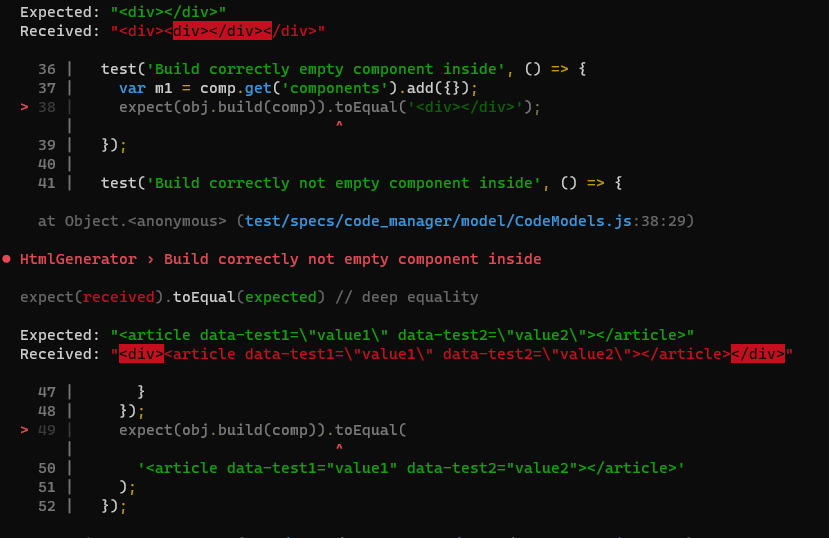
@artf I couldn't run it locally because several tests didn't pass, is it like that with you too? Can I try to fix them?
e.g.:
Thanks for reporting this, @ronaldohoch. Great question about Style click state bug in every element. The recommended approach with StyleManager is to use the event-driven API. Start here: Check the GrapesJS documentation for your specific module Look for the on() event listener method Most operati...
Related Questions and Answers
Continue research with similar issue discussions.
Issue #6248
ShowOffsets bug when iframe body has zoom
GrapesJS version [x] I confirm to use the latest version of GrapesJS What browser are you using? Chrome Reproducible demo link https://jsfi...
Issue #6549
Couldnt Resize image
GrapesJS version [x] I confirm to use the latest version of GrapesJS What browser are you using? Chrome Reproducible demo link https://code...
Issue #5810
Unnecessary Canvas style
GrapesJS version[X] I confirm to use the latest version of GrapesJSWhat browser are you using? Arc Version 1.35.0 / Chromium Engine 123.0Re...
Issue #6663
Symbols break when loading pages progressively (instances lose __symbol link)
Here is a video showing the bug: https://github.com/user-attachments/assets/0fdc76ed-cee5-4481-98b1-cbbf52572b31 GrapesJS version [x] I con...
Paid Plugins That Match This Issue
Curated by issue keywords and label relevance to help you ship faster.
Loading paid plugin recommendations...
Check the open-source GrapesJS plugins on GitHub or run a quick search in our free catalog.
Browse free plugins →Premium plugins ship with support, regular updates, and production-ready features — save days of integration work.
Browse premium plugins →Related tutorials
In-depth guides on the same topic.
Tutorial
Introducing Search on GJS.Market
GJS.Market now has one search across everything we publish — plugins, articles, community questions, guides, authors and services. Press ⌘K from any page.
Tutorial
How to Build an AI-Powered Page Builder with GrapesJS in 2026
What we learned building GJSDocs — from simple AI text generation to structured, context-aware visual editing
Tutorial
How Much Does It Cost to Build a SaaS Page Builder in 2026?
How much does it cost to build a SaaS page builder in 2026? Explore realistic development costs, timelines, features, and how using GrapesJS can reduce
Browse Plugin Categories
Jump directly to plugin category pages on the marketplace.