Error on drag block with dragmode: absolute
Thanks @tyutony the issue was fixed already (https://github.com/artf/grapesjs/pull/4487). Unfortunately, the only workaround now would be to expose globally the editor instance (window.editor = grapesjs.init({...}))
Read full answer below ↓Question
GrapesJS version
- I confirm to use the latest version of GrapesJS
What browser are you using?
Chrome v103
Reproducible demo link
https://stackblitz.com/edit/js-1xpo7b
Describe the bug
How to reproduce the bug?
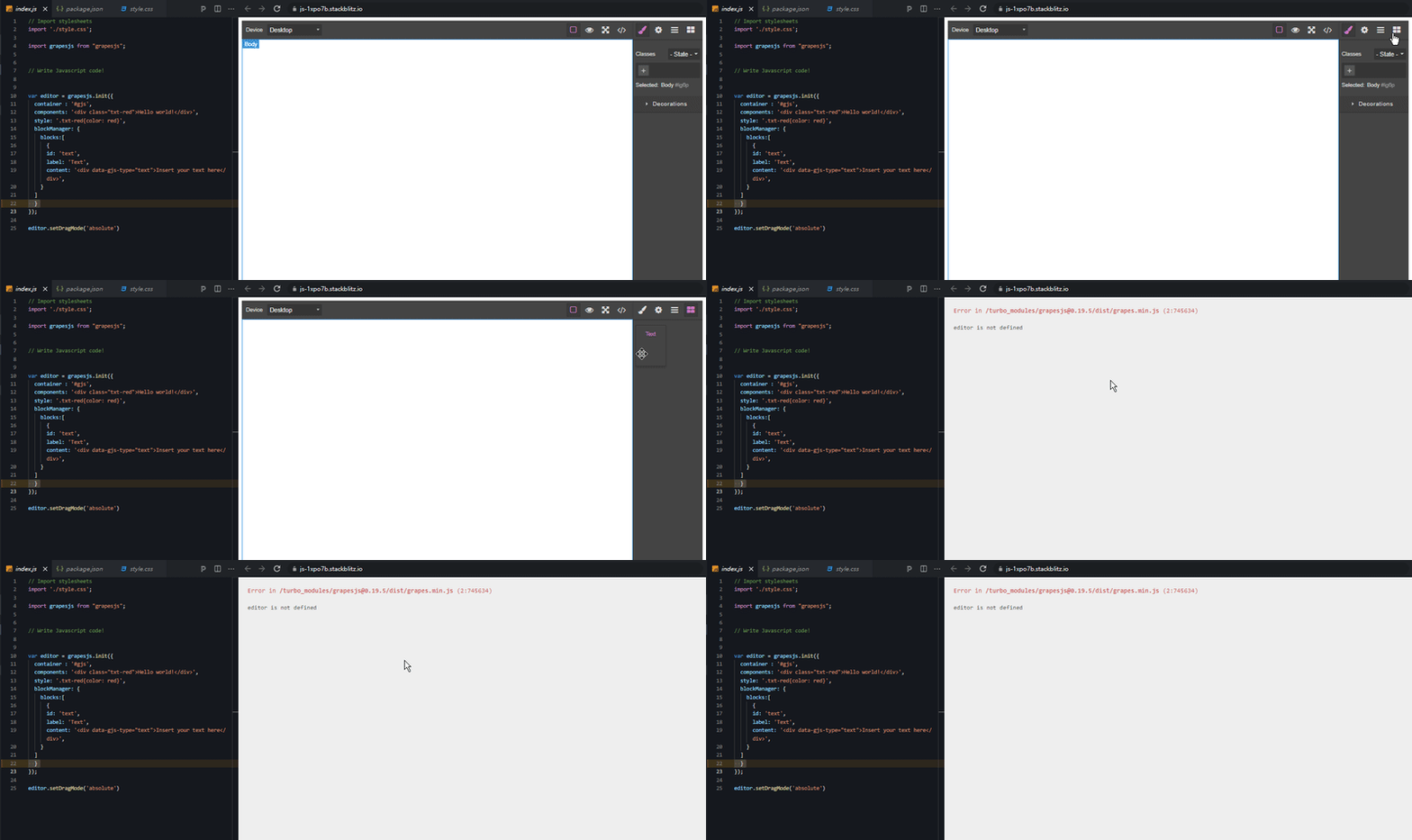
- use dragMode: absolute (designer mode)
- drag a block from Block Manager
Can not reproduce on JSFiddle here but i dont know how.
I guess is CDNs grapesjs is different with npm version grapesjs.
What is the expected behavior? No error and editor not stuck
What is the current behavior? Console Error : editor is not defined and editor stuck
Code of Conduct
- I agree to follow this project's Code of Conduct
Answers (4)
Thanks @tyutony the issue was fixed already (https://github.com/artf/grapesjs/pull/4487). Unfortunately, the only workaround now would be to expose globally the editor instance (window.editor = grapesjs.init({...}))
@tyutony I'm experiencing this same thing, did you find a workaround? Doesn't seem like the bug is fixed
@wunksert it's fixed but not yet released (the new release will be published soon)
Thanks for reporting this, @tyuterry.
Great question about Error on drag block with dragmode: absolute. The recommended approach with GrapesJS is to use the event-driven API.
Start here:
- Check the GrapesJS documentation for your specific module
- Look for the
on()event listener method - Most operations can be achieved by listening to editor and component events
Common patterns:
// Listen for changes
editor.on('change', () => console.log('something changed'));

// Component lifecycle
editor.on('component:mount', (c) => console.log('component ready', c));
editor.on('component:update', (c) => console.log('component updated', c));
If you're still stuck:
- Share a minimal CodeSandbox reproduction
- Include what you've already tried
- Mention your GrapesJS version
- The community is here to help!
Related Questions and Answers
Continue research with similar issue discussions.
Issue #4094
When drag and drop block into editor in Chrome, not able to drag and drop block
GrapesJS version [X] I confirm to use the latest version of GrapesJS What browser are you using? Version 97.0.4692.71 (Official Build) (64-...
Issue #4039
When drag and drop block into editor in Chrome, error thrown
GrapesJS version [X] I confirm to use the latest version of GrapesJS What browser are you using? Chromw 96.0.4664.45 Reproducible demo link...
Issue #4646
Even/odd state don't work as expected
GrapesJS version [X] I confirm to use the latest version of GrapesJS What browser are you using? 106.0.5249.91 Reproducible demo link https...
Issue #3947
selection box not clickable in editor
GrapesJS version[X] I confirm to use the latest version of GrapesJSWhat browser are you using? Firefox 94.0.1Reproducible demo link https:/...
Paid Plugins That Match This Issue
Curated by issue keywords and label relevance to help you ship faster.
Loading paid plugin recommendations...
Check the open-source GrapesJS plugins on GitHub or run a quick search in our free catalog.
Browse free plugins →Premium plugins ship with support, regular updates, and production-ready features — save days of integration work.
Browse premium plugins →Related tutorials
In-depth guides on the same topic.
Tutorial
How to Build a Production GrapesJS Editor: The Complete Walkthrough of Brief, Preset, Plugins, and Services
A complete walkthrough of building a production GrapesJS editor: how to choose a preset, pick plugins, and scope setup services without burning a sprint.
Tutorial
Big Updates: TinyMCE 8 and Placeholder 2.0 for GrapesJS
In May we shipped major updates to two of our most popular GrapesJS plugins — TinyMCE Inline Text Editor and Placeholder.
Tutorial
Find the Right GrapesJS Plugin in Seconds: Smarter Discovery Is Live
We're shipping a set of discovery upgrades. New label filters, a proper compatibility switch for GrapesJS vs Studio, one-click and a smarter sort bar.
Browse Plugin Categories
Jump directly to plugin category pages on the marketplace.