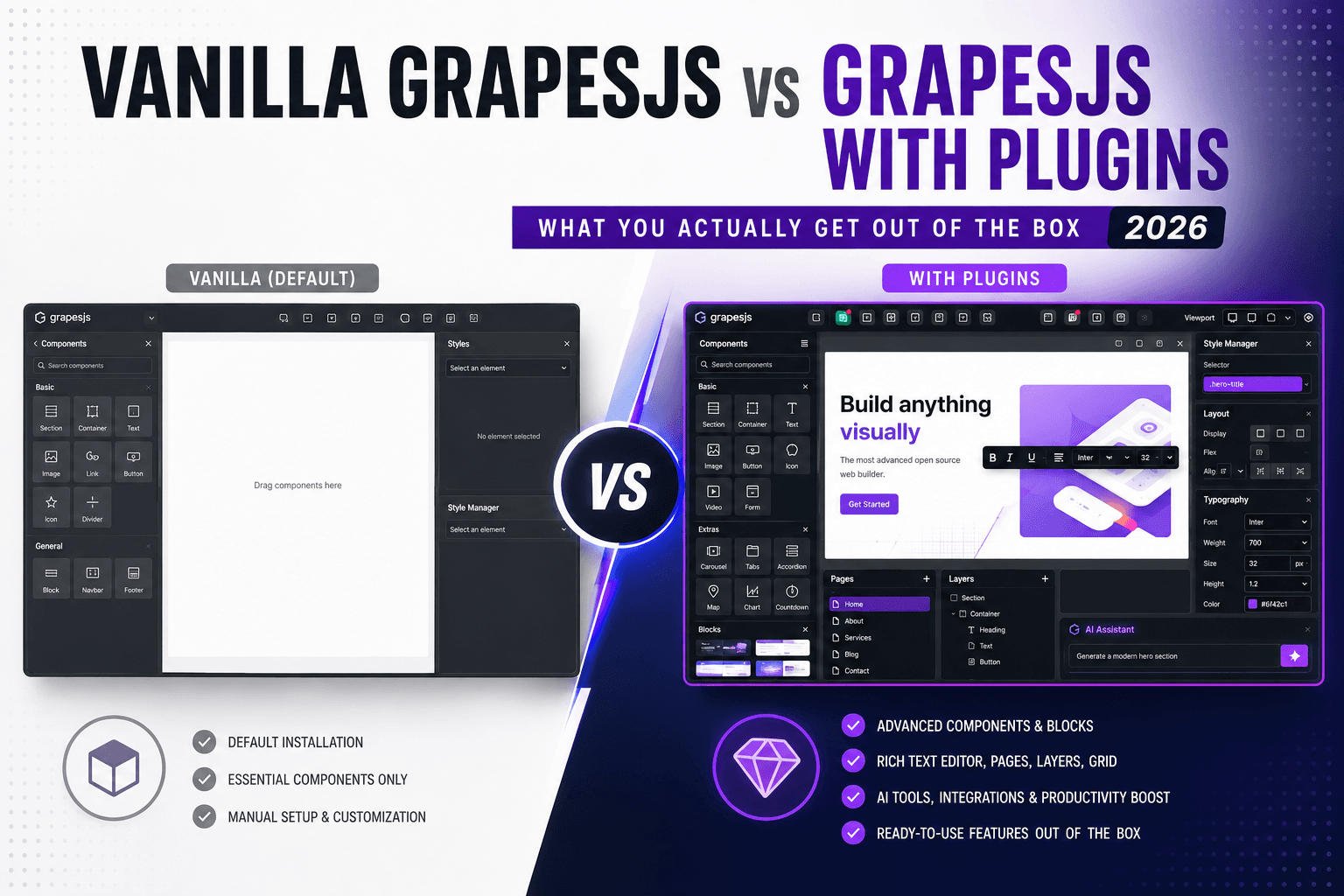

If you're evaluating GrapesJS for the first time, you've probably hit the same wall almost every newcomer does: the demo looks powerful, you drop it into your project, and then you realize the stock editor gives you a foundation, not a finished product.
That's not a flaw — it's the point. GrapesJS is a framework-agnostic engine for building visual editors, deliberately unopinionated so you can shape it into anything from an email builder to a full website designer. But "unopinionated" also means a lot of the polish you expected has to come from somewhere.
This post is an honest side-by-side: what vanilla GrapesJS ships with, where beginners get stuck, and how plugins fill those gaps. No hype — just a map so you know what you're signing up for before you write a line of code.
What vanilla GrapesJS gives you out of the box
Let's start fair. The stock editor is genuinely capable, and for a lot of projects it's enough:
- A drag-and-drop canvaswith a component/layer tree
- A style managerfor editing CSS visually (typography, spacing, backgrounds, etc.)
- A basic set of blocksif you add the official
grapesjs-blocks-basicplugin (a couple of columns, text, image, link, map, video) - A storage managerso you can wire saving to your own backend
- HTML/CSS exportvia
editor.getHtml()andeditor.getCss() - A plugin APIthat lets you extend literally everything
For a developer who enjoys building their own tooling, that's a great starting point. The trouble is that "starting point" hides a surprising amount of work — and that work is exactly where most beginners underestimate the effort.
Where vanilla GrapesJS leaves you doing the heavy lifting
Here's what tends to surprise people once they get past the demo.
1. The block library is thin
The basic blocks plugin is intentionally minimal. If you want a hero section, a pricing table, a testimonial grid, a footer with columns — none of that exists by default. You either build every block by hand as an HTML string, or you go find a block pack.
2. The rich text editor isverybasic
The built-in RTE is bold/italic/underline/link and not much else. No headings dropdown, no color picker, no lists in a friendly UI, no clean paste-from-Word handling. For a "content editor" experience, this is usually the first thing users complain about.
3. Exported HTML/CSS can get messy
Vanilla export works, but the output often carries editor-specific classes (id-based selectors, generated class names) that you'll want to clean up before shipping to production. Getting truly clean, portable markup takes configuration.
4. No ready-made sections or templates
There's no template gallery, no starter layouts. Every project begins from a blank canvas. Fine for a demo, painful when a client wants "a landing page by Friday."
5. Saving/loading data is your problem
The storage manager is a hook, not a solution. You design the JSON schema, the API endpoints, the autosave logic, and the load-on-init flow yourself.
6. Debugging is console-driven
Out of the box, inspecting the selected component or listening to editor events means a lot ofconsole.log(editor.getSelected())and throwaway listeners.
None of these are dealbreakers. But added together, they explain why so many teams spendweeksgetting a vanilla setup to feel production-ready.
Side-by-side: stock behavior vs plugin-powered
Here's the same editor, before and after, gap by gap:
| What you need | Vanilla GrapesJS | With plugins |
|---|---|---|
| Blocks | ~7 basic blocks | 40+ pre-built, styled sections (heroes, pricing, testimonials, footers) |
| Rich text editing | Bold / italic / link | Full toolbar: headings, colors, lists, alignment, clean paste |
| Layouts & templates | Blank canvas only | Ready-made sections and starter templates |
| Export quality | Works, needs cleanup | Cleaner, production-oriented output |
| Saving data | You build it | Configurable storage patterns and examples |
| Debugging | console.log | A dedicated in-editor developer panel |
| Accessibility / SEO | Manual, if at all | Live in-editor auditing with one-click fixes |
The second column isn't magic — it's just work someone already did, packaged as plugins so you don't repeat it.
The gaps, and what closes them
You don't need everything on day one. But when youdohit a wall, here's where each fix lives on the marketplace.
More (and better-looking) blocks.This is the single highest-impact upgrade for beginners, because it turns a blank canvas into something usable in minutes. Block packs likeBlocky(40+ Tailwind blocks inside the editor), Blocksmith, and Users Blocks drop in whole libraries of styled sections. Browse the full GrapesJS blocks category to see what fits your stack.
A real rich text editor.If your users will write content — and they usually will — swapping the stock RTE for a fuller one is worth it early. See the RTE plugins.
Full site-building UX.If you're building a website builder rather than a one-off editor, the site builders category bundles the pieces (blocks + panels + presets) so you're not assembling them one by one.
Email/newsletter output.GrapesJS is a popular email-builder base, but email HTML is its own painful world (tables, inline styles, client quirks). Thenewsletter pluginshandle that for you.
Debugging and quality.Once your editor grows, an in-editor DevTools panel replaces console spelunking, and a live accessibility + SEO auditor catches WCAG and SEO issues while you build, binding each finding to the exact component.
Building your own plugin.If none of the above fits and you want a custom block or component, the plugin generator scaffolds one so you're not starting from a blank file.
So — vanilla or plugins?
Here's the honest recommendation for a beginner:
Start vanilla to learn.Spend a weekend with the stock editor. Add grapesjs-blocks-basic, wire up a simple save, export some HTML. You'll understand the mental model — components, blocks, the style manager, storage — and that understanding is what makes every plugin easier to use later.
Add plugins the moment you feel a wall. Don't pre-buy a stack you don't understand yet. But when you catch yourself hand-coding your tenth block, or a user asks why they can't change a heading color, or a client wants a landing page yesterday — that's the signal. That's exactly the friction plugins are built to remove.
A minimal beginner stack
If you want the shortest path from "blank canvas" to "actually usable," start with just two or three additions:
- A block pack— the biggest visible upgrade, instantly.
- A better RTE— if humans will edit content.
- A template/site-builder preset— only if you're shipping a full builder, not a one-off editor.
Everything else (DevTools, auditors, email output) you add when the specific need shows up.
The bottom line
Vanilla GrapesJS is a fantasticengineand a frustrating product— by design. The stock editor teaches you how everything works; plugins are how you avoid rebuilding what the community already solved. For a beginner, the winning move isn't "vanilla vs plugins" at all. It's vanilla first to learn, plugins next to ship.
Ready to see what's available? Start with the blocks category— it's where most people feel the difference first.
Building something with GrapesJS? Browse plugins, presets, and templates onGJS.Market, the marketplace for the GrapesJS ecosystem.