
Visual builders make it easy to ship a page fast. They also make it easy to ship a page with an image that has noalttext, a call-to-action button that fails colour-contrast, a heading order that jumps fromh1toh4, and an empty<title>tag that quietly tanks your search ranking. None of that shows up on the canvas. It shows up later — in an audit, a compliance review, or a support ticket.
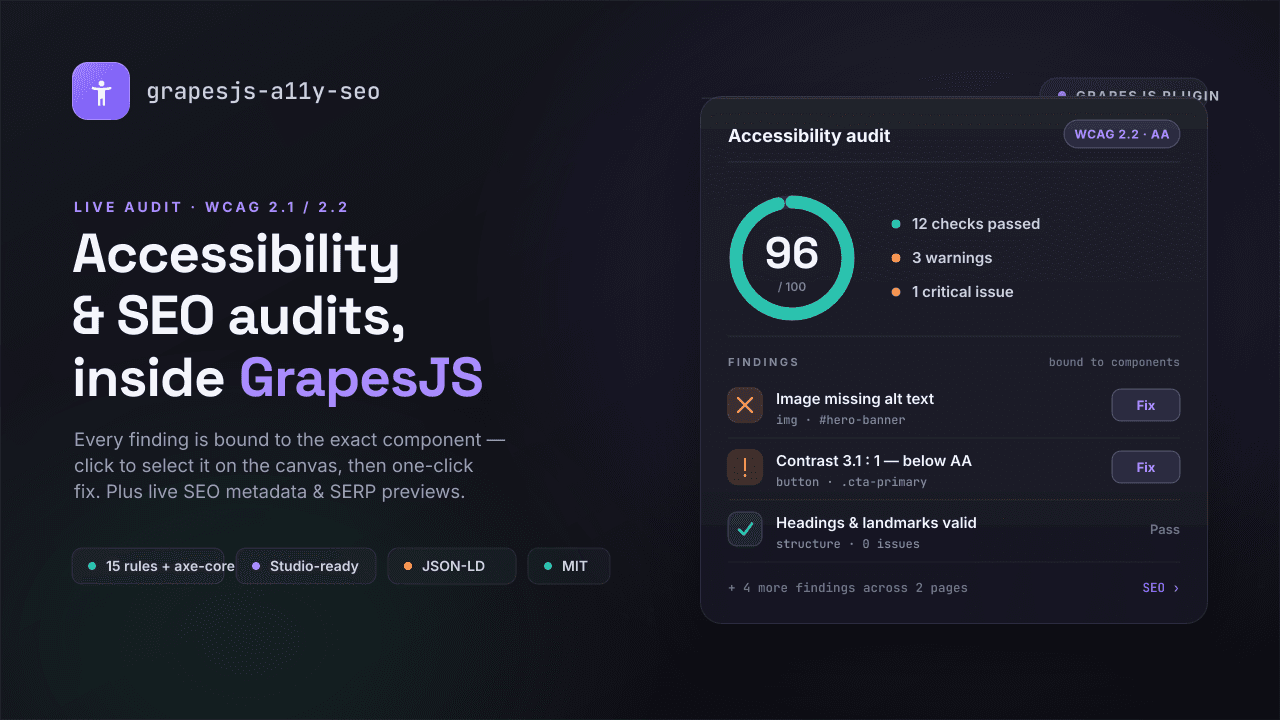
grapesjs-a11y-seo closes that gap. It's a free, open-source plugin that adds two panels to your GrapesJS editor: a live accessibility auditor built around WCAG 2.1 / 2.2, and an SEO metadata manager with real search and social previews. Think of it as Lighthouse that runs inside the editor— except every finding is wired directly to the component that caused it.
You can try the live demo before reading another word.
The problem with "audit later"
Accessibility and SEO are usually treated as a final pass — something a specialist checks after the page is "done." By then the fix is expensive: someone has to reproduce the report, hunt down the offending element in a tree of nested blocks, and edit it without breaking the layout.
The core idea behind this plugin is to move that work to where the page is actually built, and to make each issueactionable in place. Instead of a flat list of errors you have to cross-reference by hand, you get findings that select, scroll to, and highlight the exact GrapesJS component on the canvas — and, where the fix is unambiguous, resolve it with a single click.
Accessibility auditing that points at the exact component
The auditor ships with 15 built-in rules covering the issues that actually fail real audits: alt text, colour contrast, heading structure, link names, form labels, ARIA validity, landmarks,tabindex, target size, media captions, iframe titles, duplicate IDs, table structure, document language, and font size.
What makes it useful day to day is how findings behave:
- Bound to the component.Click a finding and the responsible component is selected, scrolled into view, and highlighted on the canvas. No more guessing which of forty blocks the report meant.
- One-click quick-fixes.Where a fix is safe and unambiguous, the plugin applies it through the component API — and it's undoable. A "Fix all safe" action batches those into a single undo step.
- Severity at a glance.Badges appear in the Layer Manager, a "Highlight issues" overlay marks problems on the canvas, and a focus-order visualizer and accessibility tree let you see the page the way assistive technology does.
- Baseline / "Won't fix."Real projects have known exceptions. You can mark findings as accepted, and that state is saved with the project so your report stays honest without nagging you.
- axe-core when you want 100%.The 15 rules run with zero runtime dependencies. When you need full coverage, axe-core is an optional peer you can switch on.
That last point matters for shipping: the browser bundle stays lean by default, and you opt into the heavier engine only where it earns its place.
SEO that lives with your pages
The second panel treats metadata as part of the page, not a spreadsheet you maintain elsewhere. For each page you manage title, description, canonical URL, robots directives, a focus keyword, Open Graph and Twitter fields, and the favicon.
Because guessing how metadata renders is half the battle, the plugin gives you live previews:
- AGoogle SERP preview with real pixel-width truncation, so you see exactly where your title and description get cut.
- Open Graph and Twitter card previews, so a shared link looks the way you intended.
On top of that there's an SEO checklist and JSON-LD structured data for the common schema types — Article, Product, Organization, BreadcrumbList, FAQPage and WebSite. When you're ready to publish, the SEO API exposesgetHeadHtml(),renderPage()andgetSitemap(), so the metadata andsitemap.xmlyou designed in the editor come out as clean, production-ready markup.
Getting started
Install it from npm:
npm i grapesjs-a11y-seo Register the plugin like any other GrapesJS plugin:
import grapesjs from 'grapesjs'; import a11ySeo from 'grapesjs-a11y-seo'; import 'grapesjs-a11y-seo/style.css'; const editor = grapesjs.init({ container: '#gjs', plugins: [a11ySeo], pluginsOpts: { 'grapesjs-a11y-seo': { hotkey: 'ctrl+shift+a', wcagLevel: 'AA', wcagVersion: '2.2', }, }, }); Open the panel with the hotkey (Ctrl/⌘ + Shift + A) or the ♿ toolbar button, and the audit runs against your current page. That's the whole setup — everything else is configuration you can add later.
Beyond the editor: CI, Studio, and i18n
The plugin is designed to fit a real workflow, not just a demo:
- Continuous integration.Run the same rules headless in your pipeline:
npx grapesjs-a11y-seo-ci ./dist/*.html. It exits non-zero on failures, so a regression in accessibility can fail a build the same way a broken test does. - GrapesJS Studio ready.It works in plain GrapesJS and is fully compatible with GrapesJS Studio, including multi-page projects with per-page SEO.
- Localized and typed.English, Russian and Spanish bundles ship in the box and every string is overridable, so you can localize the audit UI for your own users. TypeScript types are included, and the whole thing is MIT licensed.
Who it's for
If you build or sell sites on GrapesJS — agencies handing off client work, SaaS site builders, or teams that have to meet WCAG for legal or procurement reasons — this turns accessibility and SEO from a post-launch scramble into part of the build. Because findings are bound to components and most fixes are one click, non-specialists can resolve the majority of issues without a separate audit tool or a checklist they'll forget to open.
And it's free. Download it, fork it, use it in personal and commercial projects.
Try it
- Live preview:https://grapesjs-a11y-seo.netlify.app/?mode=plain
- Get it on GJS.Market:https://gjs.market/products/grapesjs-a11y-seo-accessibility-auditor-seo-for-grapesjs