Component disappears when we select all the inner text and use backspace. Link component disappears even when we try to update the text.
This happening due to these styles. Remove them and it will work properly.
Read full answer below ↓Question
GrapesJS version[X] I confirm to use the latest version of GrapesJSWhat browser are you using? Version 104.0.5112.101 (Official Build) (arm64)Reproducible demo link https://codepen.io/faisal-praella/pen/rNvOwgRDescribe the bug How to reproduce the bug?Select a component, double click, and ctrl+a to select the text and click backspace.Notice component disappears, and is not selectable or editable. What is the expected behavior? The component should not disappear. What is the current behavior? Component disappears, and is not selectable or editable. https://user-images.githubusercontent.com/102...
Answers (4)
This happening due to these styles.
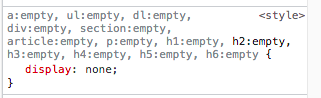 Remove them and it will work properly.
@FaisalShaikhHA are you able to provide a reproducible demo as I'm not able to reproduce it from the official demo?
@artf here is the demo: https://codepen.io/faisal-praella/pen/rNvOwgR Select a component, double click, and ctrl+a to select the text and click backspace. Notice component disappears, and is not selectable or editable. Link component disappears even when we try to update the text. Please refer abov...
Thanks for reporting this, @FaisalShaikhHA. Great question about Component disappears when we select all the inner text and use backspace. Link component disappears even when we try to update the text.. The recommended approach with Components is to use the event-driven API. Start here: Check the G...
Related Questions and Answers
Continue research with similar issue discussions.
Issue #6269
Component model and view inits every time it's dragged over every component present in Canvas on which it can be dropped into
GrapesJS version [X] I confirm to use the latest version of GrapesJS What browser are you using? Chrome Version 130.0.6723.59 (Official Bui...
Issue #4947
Undo manager not working properly on undoing a remove action
GrapesJS version[X] I confirm to use the latest version of GrapesJSWhat browser are you using? Chrome - version 110.0.5481.100 (Official Bu...
Issue #4812
Layerable property not working as expected in parent-child scenario.
GrapesJS version [X] I confirm to use the latest version of GrapesJS What browser are you using? 107.0.5304.110 (Official Build) (arm64) Re...
Issue #4576
Clicking 'wrap for style' button affects the inner components of other components inside the same text box
GrapesJS version[X] I confirm to use the latest version of GrapesJSWhat browser are you using? Chrome 104.0.5112.101 Reproducible demo link...
Paid Plugins That Match This Issue
Curated by issue keywords and label relevance to help you ship faster.
Loading paid plugin recommendations...
Check the open-source GrapesJS plugins on GitHub or run a quick search in our free catalog.
Browse free plugins →Premium plugins ship with support, regular updates, and production-ready features — save days of integration work.
Browse premium plugins →Related tutorials
In-depth guides on the same topic.
Tutorial
Introducing Search on GJS.Market
GJS.Market now has one search across everything we publish — plugins, articles, community questions, guides, authors and services. Press ⌘K from any page.
Tutorial
How to Build an AI-Powered Page Builder with GrapesJS in 2026
What we learned building GJSDocs — from simple AI text generation to structured, context-aware visual editing
Tutorial
How Much Does It Cost to Build a SaaS Page Builder in 2026?
How much does it cost to build a SaaS page builder in 2026? Explore realistic development costs, timelines, features, and how using GrapesJS can reduce
Browse Plugin Categories
Jump directly to plugin category pages on the marketplace.