My Options ( in traits ) for select component gets resetted every time after each reload of page
Hi @Sudhin35 please follow this API for your custom traits and I'd highly recommend storing your options as a component property instead of using inner components
Read full answer below ↓Question
GrapesJS version
- I confirm to use the latest version of GrapesJS
What browser are you using?
Chrome
Reproducible demo link
Not there
Describe the bug
How to reproduce the bug?
- Install Grapes js and implement the select component code
- Drag the select component into the editor
- Click on the select component and enter the traits
- Reload the page .
What is the expected behavior?
- Entered options should not be reset in the traits manager for that component
- Already entered options should be visible in the traits manager for that component
What is the current behavior? My Options ( in traits ) for select component gets resetted every time after each reload of page
If is necessary to execute some code in order to reproduce the bug, paste it here below:
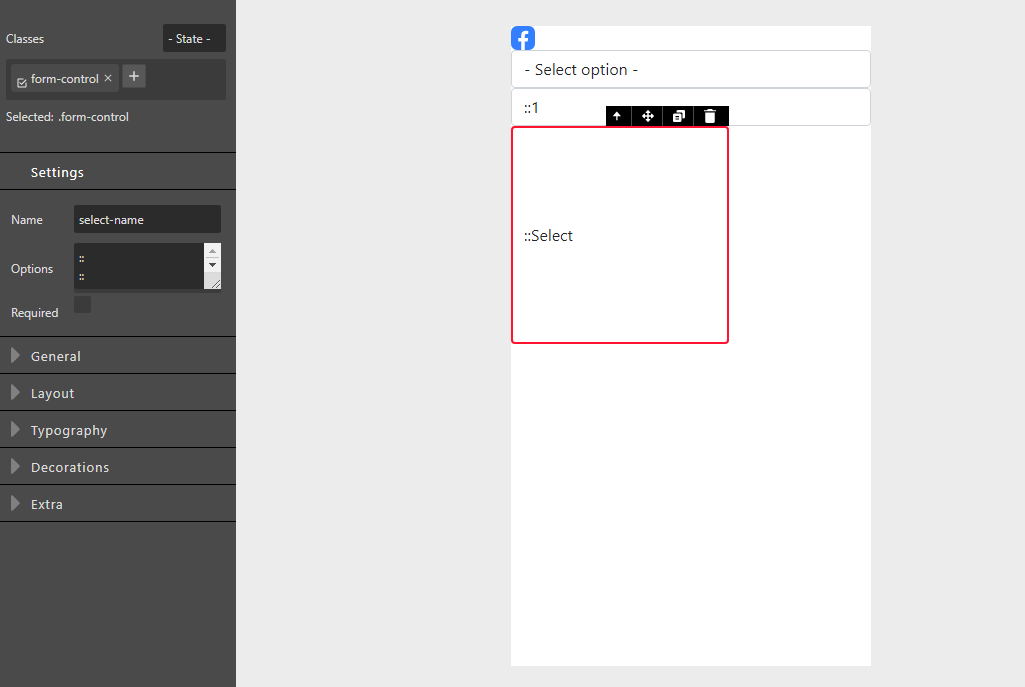
const trm = editor.TraitManager;
trm.addType('select-options', {
events:{
'keyup': 'onChange',
},
onValueChange: function () {
var optionsStr = this.model.get('value').trim();
var options = optionsStr.split('\n');
var optComps = [];
for (var i = 0; i < options.length; i++) {
var optionStr = options[i];
var option = optionStr.split('::');
var opt = {
tagName: 'option',
attributes: {}
};
if(option[1]) {
opt.content = option[1];
opt.attributes.value = option[0];
} else {
opt.content = option[0];
opt.attributes.value = option[0];
}
optComps.push(opt);
}
var comps = this.target.get('components');
comps.reset(optComps);
this.target.view.render();
},
getInputEl: function() {
if (!this.$input) {
var md = this.model;
var trg = this.target;
var name = md.get('name');
var optionsStr = '';
var opts = {placeholder: ''};
var options = trg.get('components');
for (var i = 0; i < options.length; i++) {
var option = options.models[i];
var optAttr = option.get('attributes');
var optValue = optAttr.value || '';
optionsStr += `${optValue}::${option.get('content')}\n`;
}
this.$input = document.createElement('textarea');
this.$input.value = optionsStr;
}
return this.$input;
},
});
editor.Components.addType('input-select', {
isComponent: el => el.tagName === 'SELECT',
// Model definition
model: {
defaults: {
tagName: 'select',
components:{options: [ // Array of options
{ 'opt1':'Option 1'},
]},
//draggable: 'form, form *', // Can be dropped only inside `form` elements
droppable: false, // Can't drop other elements inside
attributes: { // Default attributes
type: 'select-options',
name: 'select-name',
class:'form-control'
},
traits: [{
type: 'select-options' // built-in types: text, number, select, checkbox, color
}],
// Add some style, just to make the component visible
style: {
}
}
}
});
Code of Conduct
- I agree to follow this project's Code of Conduct
Answers (2)
Hi @Sudhin35 please follow this API for your custom traits and I'd highly recommend storing your options as a component property instead of using inner components
Thanks for reporting this, @Sudhin35.
Great question about My Options ( in traits ) for select component gets resetted every time after each reload of page. The recommended approach with StyleManager is to use the event-driven API.
Start here:
- Check the GrapesJS documentation for your specific module
- Look for the
on()event listener method - Most operations can be achieved by listening to editor and component events
Common patterns:
// Listen for changes
editor.on('change', () => console.log('something changed'));

// Component lifecycle
editor.on('component:mount', (c) => console.log('component ready', c));
editor.on('component:update', (c) => console.log('component updated', c));
If you're still stuck:
- Share a minimal CodeSandbox reproduction
- Include what you've already tried
- Mention your GrapesJS version
- The community is here to help!
Related Questions and Answers
Continue research with similar issue discussions.
Issue #3832
The css classes are removed and the autogenerated ids for each html tags gets changed ( Example : ivj5m-2) after each reload
GrapesJS version [X] I confirm to use the latest version of GrapesJS What browser are you using? Chrome Reproducible demo link Not there De...
Issue #6152
CSS added via custom code persists after custom code component is removed
GrapesJS version [X] I confirm to use the latest version of GrapesJS What browser are you using? any Reproducible demo link https://grapesj...
Issue #4792
Drag and drop broken in 20.2
GrapesJS version[X] I confirm to use the latest version of GrapesJSWhat browser are you using? Chrome v108Reproducible demo link see belowD...
Issue #4191
We are trying to store the data from grapesJS editor in Angular 10 application, getting CORS error, image attached below
GrapesJS version [x] I confirm to use the latest version of GrapesJS What browser are you using? Chrome 99.0.4844.5 Reproducible demo link...
Paid Plugins That Match This Issue
Curated by issue keywords and label relevance to help you ship faster.
Loading paid plugin recommendations...
Check the open-source GrapesJS plugins on GitHub or run a quick search in our free catalog.
Browse free plugins →Premium plugins ship with support, regular updates, and production-ready features — save days of integration work.
Browse premium plugins →Related tutorials
In-depth guides on the same topic.
Tutorial
How to Build a Production GrapesJS Editor: The Complete Walkthrough of Brief, Preset, Plugins, and Services
A complete walkthrough of building a production GrapesJS editor: how to choose a preset, pick plugins, and scope setup services without burning a sprint.
Tutorial
Big Updates: TinyMCE 8 and Placeholder 2.0 for GrapesJS
In May we shipped major updates to two of our most popular GrapesJS plugins — TinyMCE Inline Text Editor and Placeholder.
Tutorial
Find the Right GrapesJS Plugin in Seconds: Smarter Discovery Is Live
We're shipping a set of discovery upgrades. New label filters, a proper compatibility switch for GrapesJS vs Studio, one-click and a smarter sort bar.
Browse Plugin Categories
Jump directly to plugin category pages on the marketplace.