Text element not able to be selected twice after extended with events
That actually was the problem. Thanks for replying. I'll be closing the issue.
Read full answer below ↓Question
Version: 0.17.25 Are you able to reproduce the bug from the demo?[ ] Yes[x] No What is the expected behavior? Update a existing component of type text by adding an event to his view. Describe the bug detailed The event is being added, but once I select another component I cannot go back to the first one. It can only be entered one time for edition. Are you able to attach screenshots, screencasts or a live demo?[x] Yes (attach)[ ] No first, i'm trying to extend the text type component to add an event to listen when something is typed. Even if I leave only a empty events property like events:{}...
Answers (4)
That actually was the problem. Thanks for replying. I'll be closing the issue.
+1 :D We are trying to solve this issue https://github.com/artf/grapesjs/issues/1136
Because it still happening when use a ckeditor.
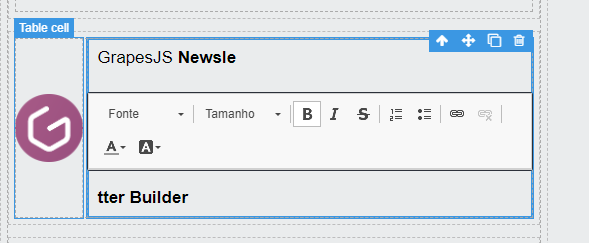
The events are not automatically merged with the extended component so, you have to do it manually.
events: {
  ...domc.getType('text').view.prototype.events,
  keypress: (e) => {...}
}
Thanks for reporting this, @gustavohleal. The issue with Text element not able to be selected twice after extended with events appears to be a race condition or state management timing problem. This typically happens when component lifecycle events and DOM modifications overlap, creating an inconsi...
Related Questions and Answers
Continue research with similar issue discussions.
Issue #3681
Textable not working with extended text component
Version: 0.17.22 Are you able to reproduce the bug from the demo?[X] Yes[ ] No What is the expected behavior? Should be able to drop a text...
Issue #3454
RTE insert link does not update DOM
Version: "0.17.3" Are you able to reproduce the bug from the demo?[X] Yes[ ] No What is the expected behavior? After inserting link using d...
Issue #3131
Paste as plain text into Text component adds <font /> wrapper to pasted text
Version: 0.16.27 Are you able to reproduce the bug from the demo? [] Yes [X] No What is the expected behavior? Paste as plain text (text no...
Issue #3295
BUG (v0.16.41): Button component with draggable property is not working properly
Version: v0.16.41 Are you able to reproduce the bug from the demo? [ ] Yes [ ] No What is the expected behavior? When we have a button with...
Paid Plugins That Match This Issue
Curated by issue keywords and label relevance to help you ship faster.
Loading paid plugin recommendations...
Check the open-source GrapesJS plugins on GitHub or run a quick search in our free catalog.
Browse free plugins →Premium plugins ship with support, regular updates, and production-ready features — save days of integration work.
Browse premium plugins →Related tutorials
In-depth guides on the same topic.
Tutorial
Introducing Search on GJS.Market
GJS.Market now has one search across everything we publish — plugins, articles, community questions, guides, authors and services. Press ⌘K from any page.
Tutorial
GJS.Market Is Now Available for India 🇮🇳
GJS.Market is expanding its global presence with a dedicated experience for developers, agencies, SaaS companies, and digital creators in India
Tutorial
How to Build an AI-Powered Page Builder with GrapesJS in 2026
What we learned building GJSDocs — from simple AI text generation to structured, context-aware visual editing
Browse Plugin Categories
Jump directly to plugin category pages on the marketplace.