Runtime updated traits not EDIT mode.
Question
Hello @artf
I having issue with a traits. When I drag and drop the block to canvas it's traits showing fine in under settings section. but when I saved and edit the in 2nd time and selected that tag in canvas that traits is now populating in setting Section. Please Please Please HELP!.
`// Custom Heading Component blockManager.add('header', { label: 'Headings', category: 'Components', media: '<svg xmlns="http://www.w3.org/2000/svg" viewBox="0 0 24 24"><path d="M8.3 11.5h7.4V6.9l-.2-1.6a1 1 0 00-.5-.5c-.3-.2-.7-.3-1-.3h-.6v-.4h6.8v.4h-.6c-.4 0-.7.1-1 .3a1 1 0 00-.6.6L18 6.9v10.3c0 .8 0 1.3.2 1.6 0 .2.2.3.4.5.4.2.7.3 1.1.3h.6v.4h-6.8v-.4h.5c.7 0 1.2-.2 1.5-.6.2-.3.3-.9.3-1.8v-4.9H8.3v4.9l.1 1.6.5.5c.3.2.7.3 1 .3h.7v.4H3.7v-.4h.6c.7 0 1.1-.2 1.4-.6.2-.3.3-.9.3-1.8V6.9L6 5.3a1 1 0 00-.5-.5l-1-.3h-.7v-.4h6.9v.4H10c-.4 0-.8.1-1 .3a1 1 0 00-.6.6l-.1 1.5v4.6z"/></svg>',
activate: 1,
select: 1,
removable: true, // Can't remove it
draggable: true, // Can't move it
copyable: true, // Disable copy/past
content: {
type: 'header',
content: 'Insert your heading'
},
});
dc.addType("header", {
isComponent: function(t) {
var e = t && t.tagName;
if (e && ["H1", "H2", "H3", "H4", "H5", "H6"].indexOf(e) >= 0) return 1
},
extend: "text",
model: {
defaults: {
name: "Heading",
tagName: "h1",
traits: [
'id',
'title',
{
type: "select",
options: [{
value: "h1",
name: "One (largest)"
}, {
value: "h2",
name: "Two"
}, {
value: "h3",
name: "Three"
}, {
value: "h4",
name: "Four"
}, {
value: "h5",
name: "Five"
}, {
value: "h6",
name: "Six (smallest)"
}, , {
value: "p",
name: "paragraph"
}],
label: "Heading Or paragraph",
name: "tagName",
changeProp: 1
}
]
}
}
});
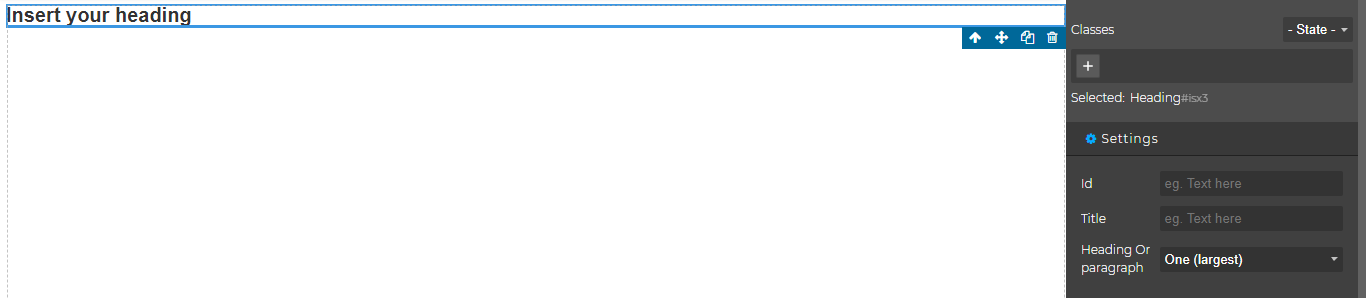
After Saving in database when in edit mode the heading not show traits

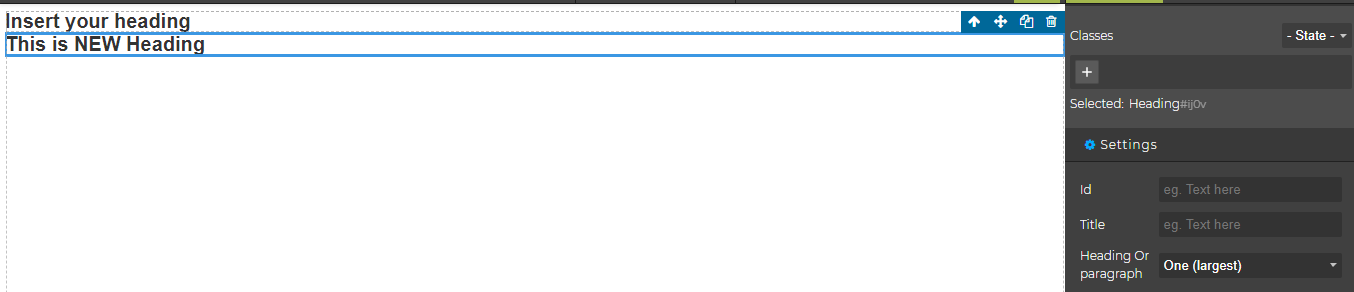
Newly added heading show the traits
Answers (4)
Are you defining your custom component in a plugin?
Are you defining your custom component in a plugin?
No. Just Add in init function
editor = grapesjs.init({ const dc = editor.DomComponents; // Custom Heading Component blockManager.add('header', { label: 'Headings', category: 'Components', media: '<svg xmlns="http://www.w3.org/2000/svg" viewBox="0 0 24 24"><path d="M8.3 11.5h7.4V6.9l-.2-1.6a1 1 0 00-.5-.5c-.3-.2-.7-.3-1-.3h-.6v-.4h6.8v.4h-.6c-.4 0-.7.1-1 .3a1 1 0 00-.6.6L18 6.9v10.3c0 .8 0 1.3.2 1.6 0 .2.2.3.4.5.4.2.7.3 1.1.3h.6v.4h-6.8v-.4h.5c.7 0 1.2-.2 1.5-.6.2-.3.3-.9.3-1.8v-4.9H8.3v4.9l.1 1.6.5.5c.3.2.7.3 1 .3h.7v.4H3.7v-.4h.6c.7 0 1.1-.2 1.4-.6.2-.3.3-.9.3-1.8V6.9L6 5.3a1 1 0 00-.5-.5l-1-.3h-.7v-.4h6.9v.4H10c-.4 0-.8.1-1 .3a1 1 0 00-.6.6l-.1 1.5v4.6z"/></svg>',
activate: 1,
        select: 1,
        removable: true, // Can't remove it
        draggable: true, // Can't move it
        copyable: true, // Disable copy/past
        content: {
            type: 'header',
            content: 'Insert your heading'
        },
    });
    dc.addType("header", {
        isComponent: function(t) {
            var e = t && t.tagName;
            if (e && ["H1", "H2", "H3", "H4", "H5", "H6"].indexOf(e) >= 0) return 1
        },
        extend: "text",
        model: {
            defaults: {
                name: "Heading",
                tagName: "h1",
                traits: [
                    'id',
                    'title',
                    {
                        type: "select",
                        options: [{
                            value: "h1",
                            name: "One (largest)"
                        }, {
                            value: "h2",
                            name: "Two"
                        }, {
                            value: "h3",
                            name: "Three"
                        }, {
                            value: "h4",
                            name: "Four"
                        }, {
                            value: "h5",
                            name: "Five"
                        }, {
                            value: "h6",
                            name: "Six (smallest)"
                        }, , {
                            value: "p",
                            name: "paragraph"
                        }],
                        label: "Heading Or paragraph",
                        name: "tagName",
                        changeProp: 1
                    }
                ]
            }
        }
    });

});The first rule of defining new component types is to place the code inside a plugin.
From docs
Thanks for reporting this, @Palash-Mandal.
Thanks for sharing your report about Runtime updated traits not EDIT mode.. To help the team investigate and prioritize this:
Please provide:
- A minimal reproducible example (CodeSandbox/JSFiddle)
- Your GrapesJS version number
- Browser and OS information
- Any error messages from the browser console
- Steps to reproduce the issue
What helps most:
- Minimal code example (not your full project)
- Screen recording or screenshot showing the issue
- Expected vs actual behavior clearly stated
- GrapesJS configuration you're using
With these details, the maintainers can identify and prioritize a fix much faster. The GrapesJS team is very responsive to well-documented issues.
Related Questions and Answers
Continue research with similar issue discussions.
Issue #3485
Element injected as HTML to canvas doesn't behave as a component
Consider a simple block: When dragged to canvas, this component can be selected and it's possible to modify its settings. Now, i'm doing th...
Issue #6324
sorter.setDragHelper is not a function on block drag
GrapesJS version[X] I confirm to use the latest version of GrapesJSWhat browser are you using? 131.0.6778.86Reproducible demo link https://...
Issue #4480
Iframe on a block can't be edited
GrapesJS version [X] I confirm to use the latest version of GrapesJS What browser are you using? Firefox v102.0.1 Reproducible demo link Th...
Issue #3579
RTE misplaced when opened right after dropping `activeOnRender` component
Version: 0.17.4 Are you able to reproduce the bug from the demo?[x] Yes[ ] No Steps to reproduce:Go to the demoDrop a "Text" block inside t...
Paid Plugins That Match This Issue
Curated by issue keywords and label relevance to help you ship faster.
Loading paid plugin recommendations...
Check the open-source GrapesJS plugins on GitHub or run a quick search in our free catalog.
Browse free plugins →Premium plugins ship with support, regular updates, and production-ready features — save days of integration work.
Browse premium plugins →Related tutorials
In-depth guides on the same topic.
Tutorial
How to Build a Production GrapesJS Editor: The Complete Walkthrough of Brief, Preset, Plugins, and Services
A complete walkthrough of building a production GrapesJS editor: how to choose a preset, pick plugins, and scope setup services without burning a sprint.
Tutorial
Embed GrapesJS in Your SaaS: A Weekend Guide
Embed GrapesJS in your SaaS and ship a white-label page builder over a weekend. Honest tradeoffs, real code, and the plugins that close the UX gap.
Tutorial
Big Updates: TinyMCE 8 and Placeholder 2.0 for GrapesJS
In May we shipped major updates to two of our most popular GrapesJS plugins — TinyMCE Inline Text Editor and Placeholder.
Browse Plugin Categories
Jump directly to plugin category pages on the marketplace.