Custom trait input not working
@RaresVlaiduc mmm I'd expect it to work also with an HTML string... I have to check it
Read full answer below ↓Question
Hi @artf !
Version: 0.17.3
Are you able to reproduce the bug from the demo?
- Yes
- No
What is the expected behavior?
The input is created correctly
Describe the bug detailed
I am trying to create a custom input (checkbox) and it doesn't work.
What is the current behavior?
See attach.
Are you able to attach screenshots, screencasts or a live demo?
- Yes (attach)
- No
Code:
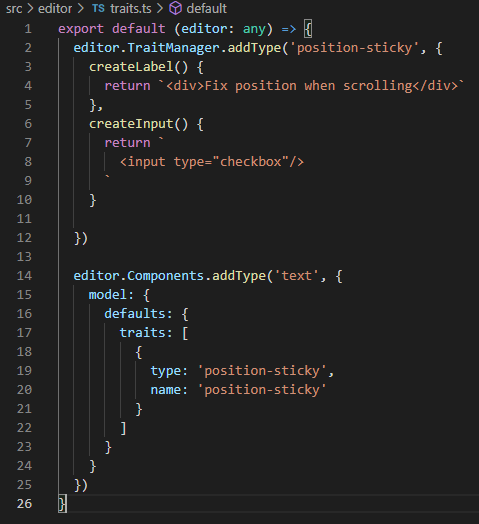
Result:

The area that should be some kind of "input" is not clickable.
If I am doing something wrong, let me know :)
Answers (4)
@RaresVlaiduc mmm I'd expect it to work also with an HTML string... I have to check it
Then, in createInput() you should return an Element.
So instead of returning a simple string, do this:
const el = document.createElement('div');
el.innerHTML = `<input type='checkbox'/>`
return el;
If you want to have a simple checkbox with label, no need to create custom trait, you can just use directly:
editor.DomComponents.addType('text', {
            model: {
              defaults: {
                traits: [
                  {type: 'checkbox', label: 'Fix position when scrolling', name: 'position-sticky'}
                ]
              }
            },
});
Thanks for reporting this, @RaresVlaiduc.
The issue with Custom trait input not working appears to be a race condition or state management timing problem. This typically happens when component lifecycle events and DOM modifications overlap, creating an inconsistent state.
What to try:
- Add a setTimeout wrapper to ensure the DOM has settled:
setTimeout(() => {
  // your operation here
}, 0);
-
Check initialization order — make sure components are fully loaded before you interact with them
-
Use the editor's event system — listen to completion events:
editor.on('component:mount', (component) => {
  // safe to interact with component here
});
Recommended next steps:
- Test with the latest GrapesJS version if you haven't
- Provide a minimal reproducible example (CodeSandbox) — this helps the team identify the root cause faster
- Include GrapesJS version, browser, and console errors in your report
Related Questions and Answers
Continue research with similar issue discussions.
Issue #3622
I18n functionality
Version: latest Are you able to reproduce the bug from the demo?[] Yes[ ] No What is the expected behavior? to editor.I18n.setLocale("es")...
Issue #3681
Textable not working with extended text component
Version: 0.17.22 Are you able to reproduce the bug from the demo?[X] Yes[ ] No What is the expected behavior? Should be able to drop a text...
Issue #3475
Toolbar/actionbar buttons do not work when there are multiple instances present (Even in your demo)
Version: 0.16.44 You can get the version by typing grapesjs.version into the console Are you able to reproduce the bug from the demo?[x] Ye...
Issue #3295
BUG (v0.16.41): Button component with draggable property is not working properly
Version: v0.16.41 Are you able to reproduce the bug from the demo? [ ] Yes [ ] No What is the expected behavior? When we have a button with...
Paid Plugins That Match This Issue
Curated by issue keywords and label relevance to help you ship faster.
Loading paid plugin recommendations...
Check the open-source GrapesJS plugins on GitHub or run a quick search in our free catalog.
Browse free plugins →Premium plugins ship with support, regular updates, and production-ready features — save days of integration work.
Browse premium plugins →Related tutorials
In-depth guides on the same topic.
Tutorial
How to Build a Production GrapesJS Editor: The Complete Walkthrough of Brief, Preset, Plugins, and Services
A complete walkthrough of building a production GrapesJS editor: how to choose a preset, pick plugins, and scope setup services without burning a sprint.
Tutorial
Big Updates: TinyMCE 8 and Placeholder 2.0 for GrapesJS
In May we shipped major updates to two of our most popular GrapesJS plugins — TinyMCE Inline Text Editor and Placeholder.
Tutorial
Find the Right GrapesJS Plugin in Seconds: Smarter Discovery Is Live
We're shipping a set of discovery upgrades. New label filters, a proper compatibility switch for GrapesJS vs Studio, one-click and a smarter sort bar.
Browse Plugin Categories
Jump directly to plugin category pages on the marketplace.