How to make 4 properties in one row,like padding,margin
Question
How could I control the properties to be show in one row or two, like the demos?
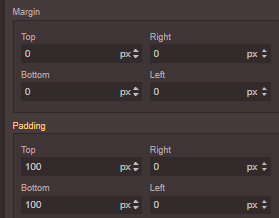
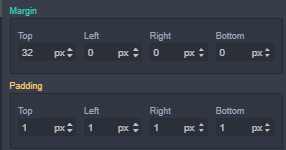 When I download the project grapesjs-preset-newsletter to local, also shows padding and margin in two rows which is puzzling.
In fact,I would like to put them flexible with customized rows and columns. Or at least, 4 properties can be controled in one row.
When I download the project grapesjs-preset-newsletter to local, also shows padding and margin in two rows which is puzzling.
In fact,I would like to put them flexible with customized rows and columns. Or at least, 4 properties can be controled in one row.
Answers (2)
Just use the CSS
Thanks for reporting this, @chenjingling90. Great question about FEAT: how to make 4 properties in one row,like padding,margin. The recommended approach with GrapesJS is to use the event-driven API. Start here: Check the GrapesJS documentation for your specific module Look for the on() event listen...
Related Questions and Answers
Continue research with similar issue discussions.
Issue #3344
I am trying to get js using getJs() method but i am getting null value. How I can get js?
Issue #3683
How to set the component cannot be deleted
Issue #3315
Mm or cm Units are converted to px
I realized that mm or cm units are converted to px. How can i solve this problem? Thank you
Issue #3444
RemoveButton() causing error
Hi, I'm trying to remove a button from panel using this code editor.Panels.removeButton('options', 'fullscreen') . It removes the button bu...
Paid Plugins That Match This Issue
Curated by issue keywords and label relevance to help you ship faster.
Loading paid plugin recommendations...
Check the open-source GrapesJS plugins on GitHub or run a quick search in our free catalog.
Browse free plugins →Premium plugins ship with support, regular updates, and production-ready features — save days of integration work.
Browse premium plugins →Related tutorials
In-depth guides on the same topic.
Tutorial
Introducing Search on GJS.Market
GJS.Market now has one search across everything we publish — plugins, articles, community questions, guides, authors and services. Press ⌘K from any page.
Tutorial
How to Build an AI-Powered Page Builder with GrapesJS in 2026
What we learned building GJSDocs — from simple AI text generation to structured, context-aware visual editing
Tutorial
How Much Does It Cost to Build a SaaS Page Builder in 2026?
How much does it cost to build a SaaS page builder in 2026? Explore realistic development costs, timelines, features, and how using GrapesJS can reduce
Browse Plugin Categories
Jump directly to plugin category pages on the marketplace.