RemoveButton() causing error
I hid it with custom css editor.Panels.getButton('options', 'fullscreen').attributes.className = 'hidepanelbtn' btw a proper solution would be nice.
Read full answer below ↓Question
Hi,
I'm trying to remove a button from panel using this code editor.Panels.removeButton('options', 'fullscreen') . It removes the button but gives me this error.
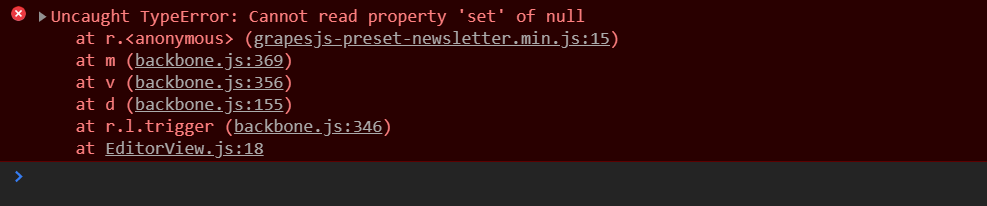 How to solve it?
Answers (4)
I hid it with custom css editor.Panels.getButton('options', 'fullscreen').attributes.className = 'hide_panel_btn' btw a proper solution would be nice.
Hi @mahfuzdiu by doing so on the official demo, it works with no errors, are you able to create a reproducible demo?
This issue has been automatically closed because there has been no response to our request for more information from the original author. With only the information that is currently in the issue, we don't have enough information to take action. Please reach out if you have or find the answers we ne...
Thanks for reporting this, @mahfuzdiu. Great question about removeButton() causing error. The recommended approach with GrapesJS is to use the event-driven API. Start here: Check the GrapesJS documentation for your specific module Look for the on() event listener method Most operations can be achie...
Related Questions and Answers
Continue research with similar issue discussions.
Issue #3333
Npm start not working
Hi, I want to develop the source code but I cannot get started. I got errors when start the project. Can anybody help me? Thank you very mu...
Issue #3419
Event to hook into after editor.render has been executed
What are you trying to add to GrapesJS? As described in BUG: Panels "visible" attribute doesn't prevent panel rendering I tried to prevent...
Issue #3350
Uncaught TypeError: can't access property "el", n is undefined
Hello, I'm using grapesjs 0.16.44 and only in firefox I'm faceing this issue. Using grapesjs block basic preset. Anyone can help me? Thank...
Issue #5046
Is there any way to remove cross svg on selected default value of Float, Position and text-align
GrapesJS version [X] I confirm to use the latest version of GrapesJS What browser are you using? Version 111.0.5563.147 (Official Build) (6...
Paid Plugins That Match This Issue
Curated by issue keywords and label relevance to help you ship faster.
Loading paid plugin recommendations...
Check the open-source GrapesJS plugins on GitHub or run a quick search in our free catalog.
Browse free plugins →Premium plugins ship with support, regular updates, and production-ready features — save days of integration work.
Browse premium plugins →Related tutorials
In-depth guides on the same topic.
Tutorial
Introducing Search on GJS.Market
GJS.Market now has one search across everything we publish — plugins, articles, community questions, guides, authors and services. Press ⌘K from any page.
Tutorial
How to Build an AI-Powered Page Builder with GrapesJS in 2026
What we learned building GJSDocs — from simple AI text generation to structured, context-aware visual editing
Tutorial
How Much Does It Cost to Build a SaaS Page Builder in 2026?
How much does it cost to build a SaaS page builder in 2026? Explore realistic development costs, timelines, features, and how using GrapesJS can reduce
Browse Plugin Categories
Jump directly to plugin category pages on the marketplace.