Block render function not trigger
The block manager doesn't see the change if you do this block.attributes.render = .... You have to update the property explicitly in this way: And be careful, the render function SHOULD return the HTML string or the DOM node, NOT a Promise. If you need to do something async, at first resolve it, THEN update the render...
Read full answer below ↓Question
@artf - In the documentation, it says that If we need to customize the aspect of each block preview we can pass a render callback function in the block.
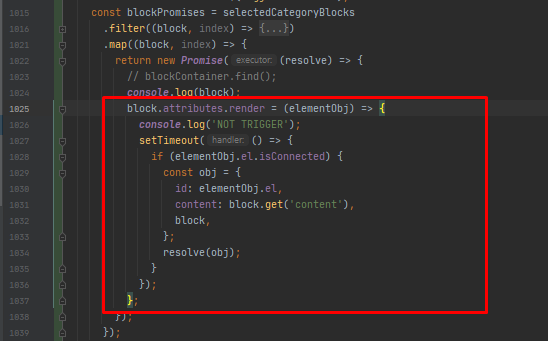
But here is the actual thing Basically, I wrapped this render callback in a function named func() and calling it on some ajax request
If I call this on page load it works but if I try to call this func() function after page load on some click event/handler or API response this render callback inside that function doesn't trigger
Answers (2)
The block manager doesn't see the change if you do this block.attributes.render = ....
You have to update the property explicitly in this way:
block.set({
 render: () => {
  return `<div>NEW HTML</div>`
 }
})
And be careful, the render function SHOULD return the HTML string or the DOM node, NOT a Promise. If you need to do something async, at first resolve it, THEN update the render with the returned content.
Thanks for reporting this, @mohd7469.
Thanks for sharing your report about block render function not trigger. To help the team investigate and prioritize this:
Please provide:
- A minimal reproducible example (CodeSandbox/JSFiddle)
- Your GrapesJS version number
- Browser and OS information
- Any error messages from the browser console
- Steps to reproduce the issue
What helps most:
- Minimal code example (not your full project)
- Screen recording or screenshot showing the issue
- Expected vs actual behavior clearly stated
- GrapesJS configuration you're using
With these details, the maintainers can identify and prioritize a fix much faster. The GrapesJS team is very responsive to well-documented issues.
Related Questions and Answers
Continue research with similar issue discussions.
Issue #3663
Default styling properties are not being re-selected when switiching devices
Hi, Default styling properties are not being selected when switching devices. Steps to reproduce: Open [http://grapesjs.com/demo.html] Sele...
Issue #3303
Category order not displaying properly
Hi! I want to display the categories in block manager in certain sequence. I looked into docs and previous issues and found about order att...
Issue #3251
How can I specify position of dropped element ?
I want to specify the position of dragging element. for example, if I have a header block which no matter where you drag, it should be plac...
Issue #3619
how to add video upload and save to backend?
Hi artf, I have implemented image upload with multiple images and save it to remote database. Same way how to upload single video and save...
Paid Plugins That Match This Issue
Curated by issue keywords and label relevance to help you ship faster.
Loading paid plugin recommendations...
Check the open-source GrapesJS plugins on GitHub or run a quick search in our free catalog.
Browse free plugins →Premium plugins ship with support, regular updates, and production-ready features — save days of integration work.
Browse premium plugins →Related tutorials
In-depth guides on the same topic.
Tutorial
How to Build a Production GrapesJS Editor: The Complete Walkthrough of Brief, Preset, Plugins, and Services
A complete walkthrough of building a production GrapesJS editor: how to choose a preset, pick plugins, and scope setup services without burning a sprint.
Tutorial
GrapesJS vs Webflow vs Builder.io vs Puck: Which Visual Builder to Choose in 2026
A practitioner's 2026 comparison of GrapesJS, Webflow, Builder.io, and Puck — pricing, AI features, lock-in, and a one-line rule for picking the right one
Tutorial
GrapesJS vs Webflow vs Tilda (2026): Honest Comparison, Pricing & Which to Pick
GrapesJS vs Webflow vs Tilda compared head-to-head: real 2026 pricing, SEO features, code export, and which one actually fits your project
Browse Plugin Categories
Jump directly to plugin category pages on the marketplace.