Preview mode does not run the scripts
Scripts are working, the problem is that your script was already executed inside the editor and the preview mode doesn't re-render the content... For any custom behavior, I would suggest creating your own preview command
Read full answer below ↓Question
Hi all,
I am checking Grapesjs for our product
After allowing scripts in the editor and ,writing this simple example
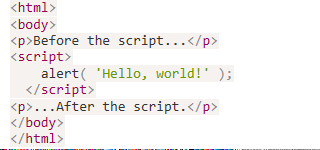 i pressed the import and indeed saw the hello world which is great.
however when using the preview mode i don't see the alert ( or anything else i tried instead of the alert) .
how can i make it work?
Do i need to configure something to execute scripts in preview mode?
thanks for the help!
i pressed the import and indeed saw the hello world which is great.
however when using the preview mode i don't see the alert ( or anything else i tried instead of the alert) .
how can i make it work?
Do i need to configure something to execute scripts in preview mode?
thanks for the help!
Answers (1)
Scripts are working, the problem is that your script was already executed inside the editor and the preview mode doesn't re-render the content... For any custom behavior, I would suggest creating your own preview command
Related Questions and Answers
Continue research with similar issue discussions.
Issue #2381
Is it possible to add info modal on the editor
Hi, I would like to add on the grapejs editor a clickable questionmark we can click so we could give information on what does this specific...
Issue #1470
Possible memory leaks
Hi, I am working on a project with Angular 6 and I am investigating a memory leak after destroying the editor on _previousAttributes and po...
Issue #3369
Is it possible add a relative offset for the colorpicker
for example: I add a left bar and top bar outside the editor. I know the colorpicker's position is relative the body, so is it possible add...
Issue #1294
How to add category for default block manager?
@artf I want put all default blocks to category named "Basic". But I can't find any documents about it. I use editor.BlockManager.getAll()....
Paid Plugins That Match This Issue
Curated by issue keywords and label relevance to help you ship faster.
Loading paid plugin recommendations...
Check the open-source GrapesJS plugins on GitHub or run a quick search in our free catalog.
Browse free plugins →Premium plugins ship with support, regular updates, and production-ready features — save days of integration work.
Browse premium plugins →Related tutorials
In-depth guides on the same topic.
Tutorial
How to Build an AI-Powered Page Builder with GrapesJS in 2026
What we learned building GJSDocs — from simple AI text generation to structured, context-aware visual editing
Tutorial
How Much Does It Cost to Build a SaaS Page Builder in 2026?
How much does it cost to build a SaaS page builder in 2026? Explore realistic development costs, timelines, features, and how using GrapesJS can reduce
Tutorial
UnStudio for GrapesJS: 4 Plugins to Build Better Visual Editors
Meet UnStudio, a new GrapesJS plugin studio with four tools, safer and better editor: Command Palette, Responsive Pack, Autosave & Restore, and Autofill
Browse Plugin Categories
Jump directly to plugin category pages on the marketplace.