Is it possible to add info modal on the editor
Currently, there is no documentation about extending/updating style manager properties (I've just realized few plugins like grapesjs-style-filter and grapesjs-style-gradient but is not enough) and in all honesty, what I've done so far (as public API) it's not that solid, I don't like it. I'd like to reach the same res...
Read full answer below ↓Question
Hi,
I would like to add on the grapejs editor a clickable questionmark we can click so we could give information on what does this specific spec to the user.
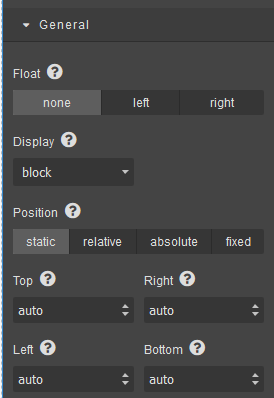
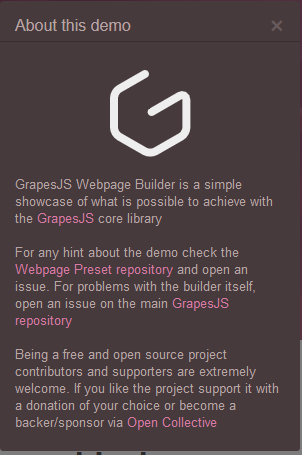
It would open a modal with all the information that we could give when we add the property to a sector. Like you do in the webpage demo.
Answers (3)
Currently, there is no documentation about extending/updating style manager properties (I've just realized few plugins like grapesjs-style-filter and grapesjs-style-gradient but is not enough) and in all honesty, what I've done so far (as public API) it's not that solid, I don't like it. I'd like t...
Here what i made today with a bit of modifications :

It's look i wanted now i juste need to find a way to put in the content i want in the modal
Hey, how can i publish my branch with my modification for a pull request ? This is PropetyView changes i've done I've also add css for these specific modal based on the css of the modal you use
Related Questions and Answers
Continue research with similar issue discussions.
Issue #2364
How to add toolbar functionality to the layers panel.
I am trying to add the toolbar to the layers panel and I am not sure how to go about this. Is there any way to accomplish this? toolbar Whe...
Issue #3267
Cannot set 0px box shadow blur
For some reason, the editor does not allow to set the blur to 0px. 0 always magically turns into 5px. <img width="243" alt="Screenshot 2021...
Issue #508
If you add a checkbox trait, it does not render correctly in the settings panel unless there is also a text trait
A text trait and a checkbox: Results in: If checkbox only: The checkbox overlaps the label:
Issue #3139
Disable <table> being auto amended during save
I'm getting an issue, when saving a custom HTML component (just a table), grapes JS will modify it. before save after save. So I want to be...
Paid Plugins That Match This Issue
Curated by issue keywords and label relevance to help you ship faster.
Loading paid plugin recommendations...
Check the open-source GrapesJS plugins on GitHub or run a quick search in our free catalog.
Browse free plugins →Premium plugins ship with support, regular updates, and production-ready features — save days of integration work.
Browse premium plugins →Related tutorials
In-depth guides on the same topic.
Tutorial
Super Tooltip for GrapesJS — Version 0.1.5 Released 🎉
We’re excited to announce the v 0.1.5 update of Super Tooltip, our floating‑menu and tooltip plugin for GrapesJS
Tutorial
GrapesJS in 2026: The Complete Guide to the Open-Source Web Builder Framework
Master GrapesJS in 2026. Architecture, code examples, React integration, plugin development, Studio SDK, and how it compares to other projects
Browse Plugin Categories
Jump directly to plugin category pages on the marketplace.