How to change the label of traits?
Question
I'd like change the labels of triats which are going to be french.
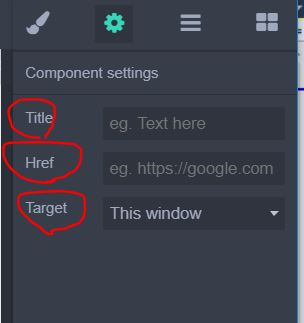
Could you give a piece of example code? Thank you Artur
Answers (3)
You just need to define the label! :)
          traits: [{
            type: 'text',
            label: 'Title',
            name: 'title',
            placeholder: 'Lorem ipsum',
            changeProp: 1
          }]
@NicoEngler Hi Thank you for reply! but I'm trying to modify existing built in traits. i'm not trying to create custom traits..
From what I have observed, you cannot define a label for the built in traits. Also the name (with uppercase(0)) is used if a label is undefined. That's why I guess your best bet is to define your traits along with proper label. Or better, write a PR for this. 👍 I may be wrong on this, maybe Artur...
Related Questions and Answers
Continue research with similar issue discussions.
Issue #1835
How to open up 'Settings' all the time?
I'd like make 'Settings' opened at all times by default without having users to open up manually. How'd you do that? Thank you..
Issue #1706
How to get href from rte?
I have this rte toolbar where you can type and click 'save' and it's going to create a link for the selected text. but the problem is that...
Issue #1828
Add an additional text box for image upload modal?
Hi Artur, I'm wondering if that's possible to add some input boxes for image upload modal? I'd like to add some boxes in the red area in th...
Issue #1826
How to add link to an image?
Hi Artur, How to add a link to this image? If i need to create a custom component, please give me some example code Artur.. Thank you so mu...
Paid Plugins That Match This Issue
Curated by issue keywords and label relevance to help you ship faster.
Loading paid plugin recommendations...
Check the open-source GrapesJS plugins on GitHub or run a quick search in our free catalog.
Browse free plugins →Premium plugins ship with support, regular updates, and production-ready features — save days of integration work.
Browse premium plugins →Related tutorials
In-depth guides on the same topic.
Browse Plugin Categories
Jump directly to plugin category pages on the marketplace.