Select the initial background color doesn't work
Hi @tranthanhhoa & @RJCAM, The bug indeed only appears when specifically selecting a background color value of #000000. Tracking it down, it is due to the background-color property's default value of 'none' being set as '' by the color input. It later gets converted to #000000 by the color picker, whereas its actual v...
Read full answer below ↓Question
Version: 0.16.18
Bug: Select the initial background color is not working
How to reproduce it: https://imgur.com/xqkt46E
Actually:
- Component's background does not changes.
Expected:
- Component's background should change to #000000
Thanks @artf !
Answers (3)
Hi @tranthanhhoa & @RJCAM, The bug indeed only appears when specifically selecting a background color value of #000000. Tracking it down, it is due to the background-color property's default value of 'none' being set as '' by the color input. It later gets converted to #000000 by the color picker,...
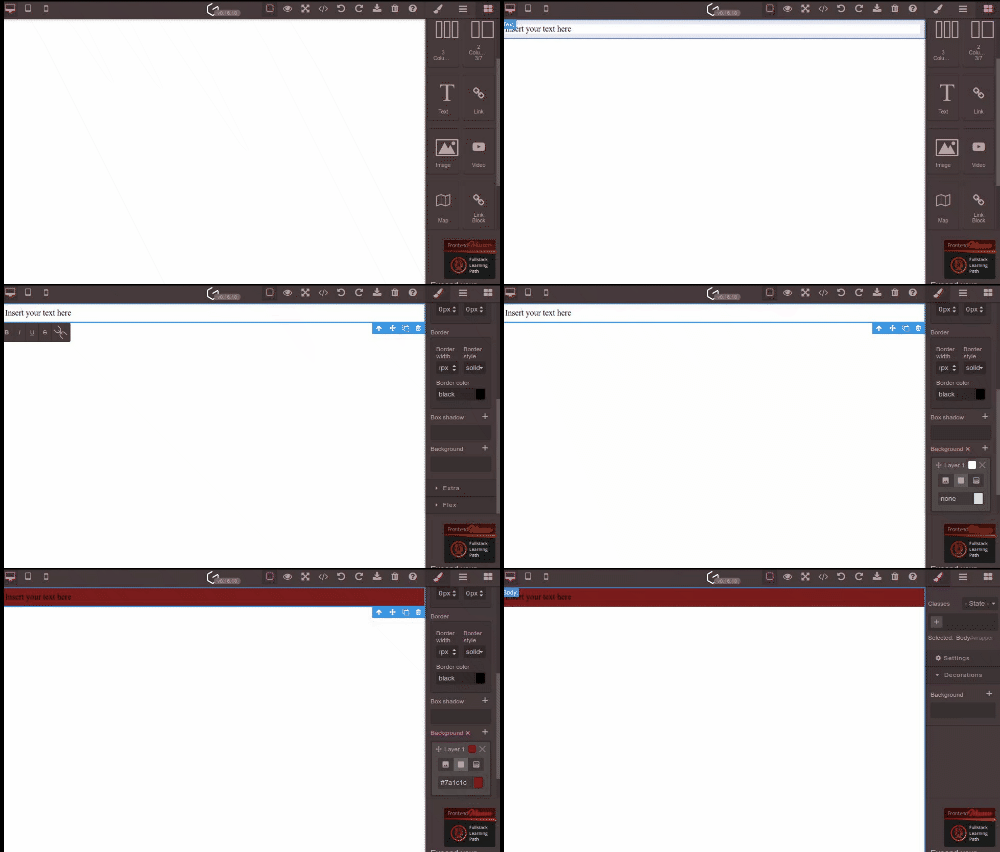
@tranthanhhoa I'm not able to reproduce this bug in the demo (same as you), it's working fine here, check this:
What did you do before?
background-color property's default value to transparent worked for me. Thank you so much @mcottret !
Related Questions and Answers
Continue research with similar issue discussions.
Issue #4257
Background modification doesn't work for non-images
GrapesJS version [X] I confirm to use the latest version of GrapesJS What browser are you using? Chrome v100 Reproducible demo link https:/...
Issue #6087
Undo doesn't work after a Component's innerHTML is changed
GrapesJS version [X] I confirm to use the latest version of GrapesJS What browser are you using? Latest Reproducible demo link https://jsfi...
Issue #5268
Autoplay for youtube or vimeo doesn't work
GrapesJS version [X] I confirm to use the latest version of GrapesJS What browser are you using? Chrome v115 Reproducible demo link https:/...
Issue #2766
Set background-color to table/table-cell in Firefox not working
Hi Where can I reproduce it? In demo url: https://grapesjs.com/demo-newsletter-editor.html Browser info: Firefox 75.0 How can I reproduce i...
Paid Plugins That Match This Issue
Curated by issue keywords and label relevance to help you ship faster.
Loading paid plugin recommendations...
Check the open-source GrapesJS plugins on GitHub or run a quick search in our free catalog.
Browse free plugins →Premium plugins ship with support, regular updates, and production-ready features — save days of integration work.
Browse premium plugins →Browse Plugin Categories
Jump directly to plugin category pages on the marketplace.