Body sectors
Hi @verloka & @pouyamiralayi, The sectors list seems to be common to all applications components. However, components hold a list of attributes that can be edited through the style manager panel when they are selected, which is used to filter the application sectors. From the Component API Reference, you can use the s...
Read full answer below ↓Question
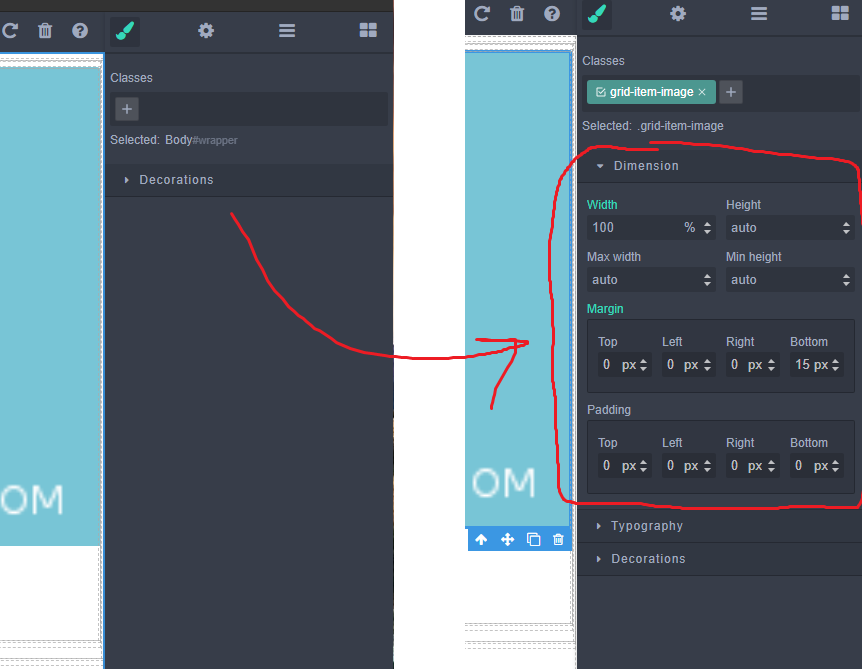
How to add the Dimension sector for the body?
Answers (3)
Hi @verloka & @pouyamiralayi, The sectors list seems to be common to all applications components. However, components hold a list of attributes that can be edited through the style manager panel when they are selected, which is used to filter the application sectors. From the Component API Referenc...
@verloka based on @mcottret answer, you can bring back the whole styling options like this:
editor.on('load', function () {
            editor.getWrapper().set('stylable',true)
            //...
Cheers!
> Hi @verloka & @pouyamiralayi,> The sectors list seems to be common to all applications components.> However, components hold a list of attributes that can be edited through the style manager panel when they are selected, which is used to filter the application sectors.> From the Component API Ref...
Related Questions and Answers
Continue research with similar issue discussions.
Issue #2364
How to add toolbar functionality to the layers panel.
I am trying to add the toolbar to the layers panel and I am not sure how to go about this. Is there any way to accomplish this? toolbar Whe...
Issue #3369
Is it possible add a relative offset for the colorpicker
for example: I add a left bar and top bar outside the editor. I know the colorpicker's position is relative the body, so is it possible add...
Issue #2677
How to delete a list with devices
How to delete a list with devices?
Issue #899
Add button to selected element panel
How to add custom button to that panel:
Paid Plugins That Match This Issue
Curated by issue keywords and label relevance to help you ship faster.
Loading paid plugin recommendations...
Check the open-source GrapesJS plugins on GitHub or run a quick search in our free catalog.
Browse free plugins →Premium plugins ship with support, regular updates, and production-ready features — save days of integration work.
Browse premium plugins →Browse Plugin Categories
Jump directly to plugin category pages on the marketplace.