How to show plain text as trait
Try to And then use CSS to hide what you don't need.
Read full answer below ↓Question
I want to show plain text within the trait under the setting button.
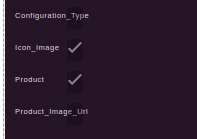
In the above image 'Configuration_Type' I want to show as plain text. How can I achieve this?
Answers (3)
Try to
traits: [
  {
    type: 'hidden',
    label: 'Type',
  },
],
And then use CSS to hide what you don't need.
Thanks. It worked.
This thread has been automatically locked since there has not been any recent activity after it was closed. Please open a new issue for related bugs.
Related Questions and Answers
Continue research with similar issue discussions.
Issue #995
How to add fields on trait dynamically
I am building the trait when the application starts. so getting the below fields at side bar as settings Now I want more field to be loaded...
Issue #362
How to create custom link components that prompts users to type link/choose link similar to Images Component Modal
Image Components have logic to call Modal and prompt user's interaction for options/configuration of image url. Would like to do similar to...
Issue #987
Dropdown indicator not displayed for a custom trait
Hello, the dropdown (select) element arrow indicator icon is not rendered when adding a custom trait to a component: I'm using following co...
Issue #899
Add button to selected element panel
How to add custom button to that panel:
Paid Plugins That Match This Issue
Curated by issue keywords and label relevance to help you ship faster.
Loading paid plugin recommendations...
Check the open-source GrapesJS plugins on GitHub or run a quick search in our free catalog.
Browse free plugins →Premium plugins ship with support, regular updates, and production-ready features — save days of integration work.
Browse premium plugins →Related tutorials
In-depth guides on the same topic.
Browse Plugin Categories
Jump directly to plugin category pages on the marketplace.