
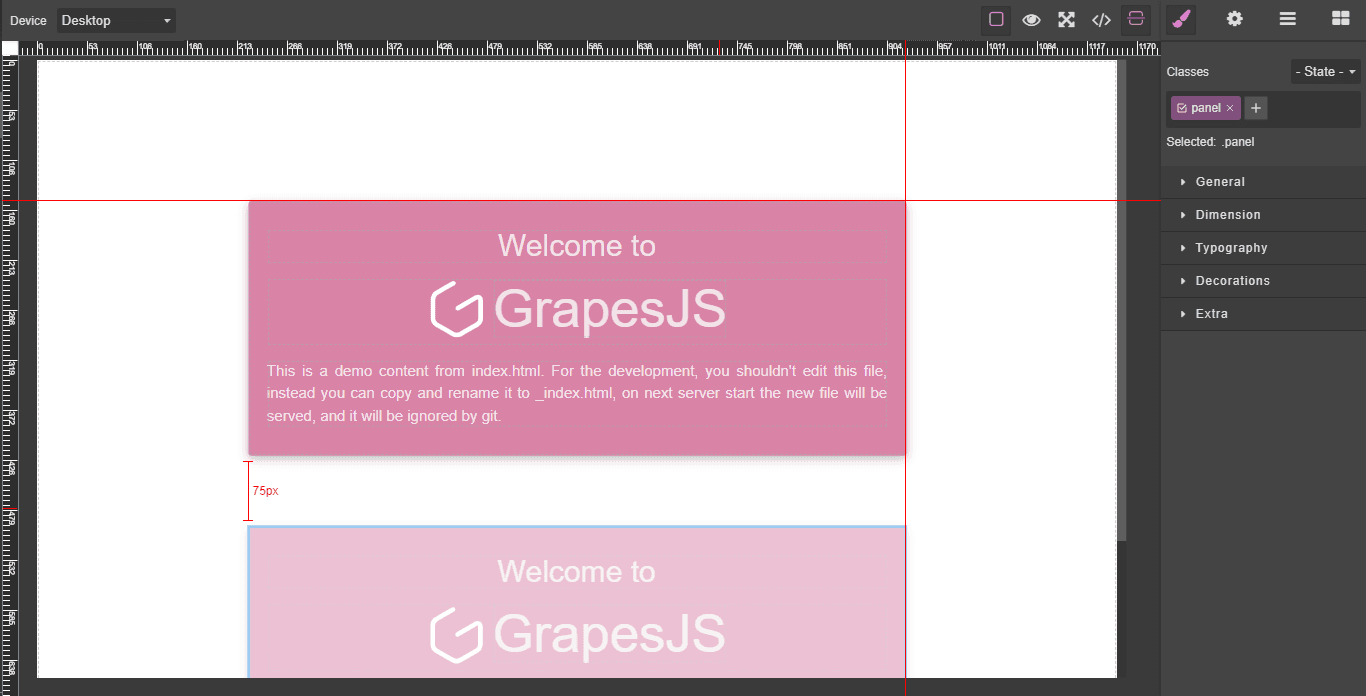
Grapesjs Rulers

What's Included
- Free to download & use
- Open for personal & commercial use
Support The Creator
Use one-time or monthly support to thank the creator for this free product.
GrapesJS Compatible
Tested with GrapesJS 0.18.x, 0.19.x, 0.20.x, 0.21.x
Open Source on GitHub
Free to use, fork, and contribute
Editor Compatible
Designed for the GrapesJS open-source editor
Free to Use
Open for personal and commercial projects
Precise alignment is the one thing a canvas without rulers cannot give you. This plugin adds rulers along both edges of the GrapesJS canvas and draggable guides that components can be lined up against — the working environment of a design tool rather than a form.
Commands
ruler-visibilityandguides-visibility— toggle rulers and guides independently.get-guidesandset-guides— read the current guides as an array and restore them later. This is what makes guides persistable: save the array with your project and set it back on load.clear-guides— remove every guide at once.set-zoom— set the canvas zoom and update the rulers to match, as ineditor.runCommand('set-zoom', { zoom: 90 }).get-rulersandget-rulers-constructor— reach the ruler object or its constructor directly.destroy-ruler— tear the rulers down.
Options
rulerHeight sets ruler thickness, 15 by default. canvasZoom sets the initial zoom level to 94, leaving room for the rulers. dragMode is the drag mode applied when rulers are toggled — translate by default — and rulerOpts passes through to the ruler object.
Good to know
Install as grapesjs-rulers.
Ratings:
No reviews yet. Be the first to share your experience.
Questions & Answers
No questions yet. Have something to ask?
Common problems this plugin can help fix
Real community questions on the same topic — see how others worked around them.
- #6445✓ Solved · 3
The doc website has missing info
- #5154✓ Solved · 4
TS2416: Property '_up' in type 'PropertyStack' is not assignable to the same property in base type 'PropertyComposite<PropertyStackProps>'
- #4148💬 3 answers
0.18.2 / 0.18.3 removes all on... HTML attributes when block is drag-dropped in the builder
- #3184💬 4 answers
Click issue on integrating grapesjs-style-bg plugin to the web builder