
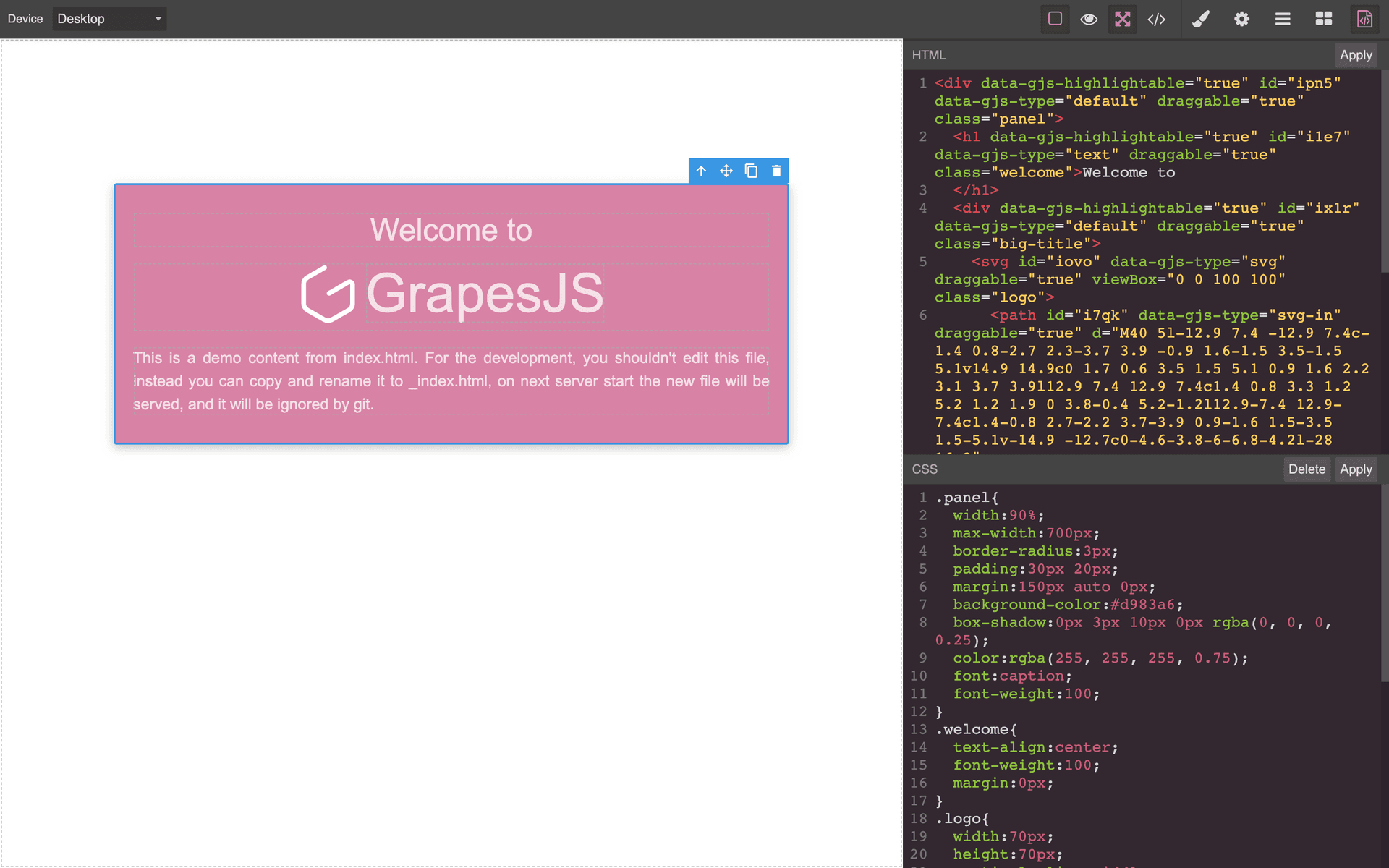
Grapesjs Component Code Editor

What's Included
- Free to download & use
- Open for personal & commercial use
Support The Creator
Use one-time or monthly support to thank the creator for this free product.
GrapesJS Compatible
Tested with GrapesJS 0.18.x, 0.19.x, 0.20.x, 0.21.x
Open Source on GitHub
Free to use, fork, and contribute
Editor Compatible
Designed for the GrapesJS open-source editor
Free to Use
Open for personal and commercial projects
The stock GrapesJS code view shows the whole document. This plugin scopes it: select a component and its own HTML and CSS open in the right-hand panel, editable, with changes applied back to that component alone.
Commands
open-code— opens the editor in the side panel. Wire it to a panel button in your editor config.code-editor-objectandcode-editor-constructor— reach theCodeEditorinstance or its constructor from your own code.
Layout options
openState and closedState set how the panel and canvas split — 35/65 when open and 15/85 when closed by default. preserveWidth stops the resizing entirely, and appendTo or panelId place the editor somewhere other than the default views container.
The selector problem it solves
Deleting a CSS rule in a code editor does not remove the selector from the GrapesJS Selector Manager, so the rule keeps affecting the component after saving. cleanCssBtn, on by default, adds a button that removes the selector from both places. It applies to valid CSS rules.
Recommended pairing
The author recommends using grapesjs-parser-postcss alongside this plugin: the default CSS parser is inconsistent and adds a lot of extra rules, which becomes visible as soon as you read your own CSS back.
Ratings:
No reviews yet. Be the first to share your experience.
Questions & Answers
No questions yet. Have something to ask?
Common problems this plugin can help fix
Real community questions on the same topic — see how others worked around them.
- #2909💬 2 answers
Support for search and commands in the editor for custom components
- #6152💬 4 answers
CSS added via custom code persists after custom code component is removed
- #6102✓ Solved · 3
Traits Not Displayed After Reloading Editor for Custom Component
- #4503💬 4 answers
Missing inline styles used by CKEditor when adding raw html components