
Grapesjs Blockly

What's Included
- Free to download & use
- Open for personal & commercial use
Support The Creator
Use one-time or monthly support to thank the creator for this free product.
GrapesJS Compatible
Tested with GrapesJS 0.17.x, 0.18.x, 0.20.x
Open Source on GitHub
Free to use, fork, and contribute
Editor Compatible
Designed for the GrapesJS open-source editor
Free to Use
Open for personal and commercial projects
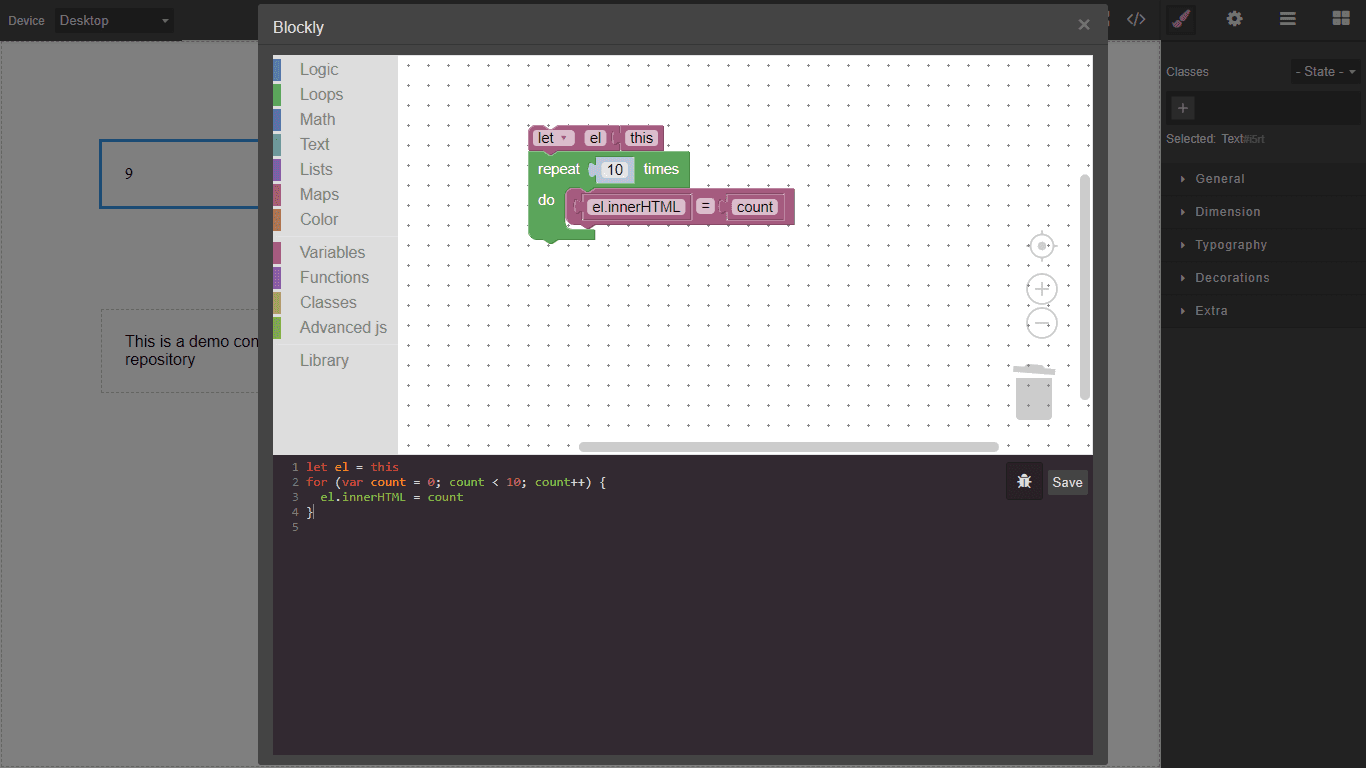
Adding interactivity to a page built visually normally means dropping to JavaScript. This plugin offers a middle path: Google Blockly's drag-and-drop programming interface, opened from a component's toolbar, generating the script attached to that component.
What it adds
A blockly-script command and a toolbar button that opens the Blockly workspace in a modal. The generated code is attached to the selected component, so behaviour travels with the element rather than living in a separate file.
Options
blocklyOptions—toolboxreplaces the default Blockly toolbox,toolboxPushadds to it, andworkspaceOptionspasses injection options straight to Blockly.starter— the canvas starter blocks. The default generateslet el = this, giving the script a reference to its own component.blocklyTypesSupport— which component types may have scripts attached. Defaults todefault,wrapper,text,textnode,image,videoandsvg. Leave out components that already define their own scripts.onRunandonError— hooks fired after the syntax check passes or fails.modalTitle,buttonLabel,toolbarIconandcodeViewOptions— interface details.
Requirements
Blockly must be present, and the @blockly/block-plus-minus plugin is recommended. Register this plugin after your other components.
Ratings:
No reviews yet. Be the first to share your experience.
Questions & Answers
No questions yet. Have something to ask?
Common problems this plugin can help fix
Real community questions on the same topic — see how others worked around them.