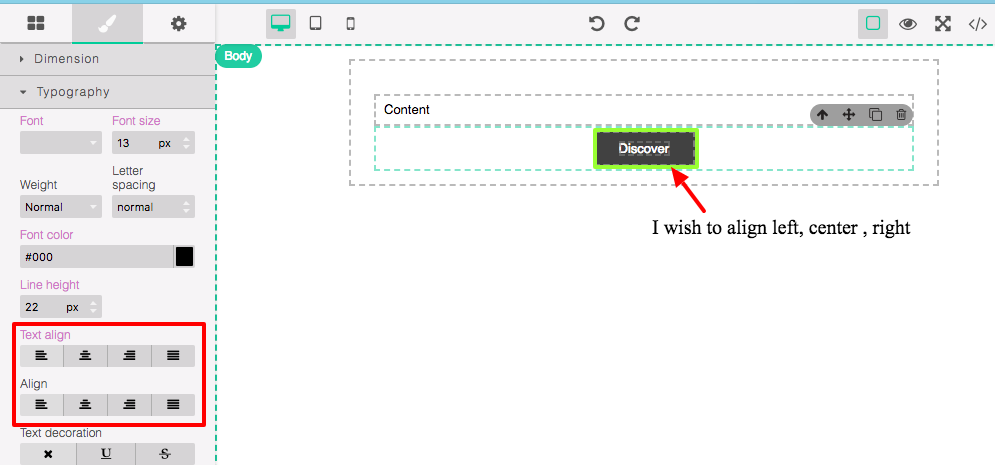
Not able to align the custom component
I don't know what your Align stands for but Text align should be applied to the parent element
Read full answer below ↓Question
@artf I created my custom component tyep and inserted vai BlockManager and if I'm applying the style propeties to that, is not working.
Answers (2)
I don't know what your Align stands for but Text align should be applied to the parent element
This thread has been automatically locked since there has not been any recent activity after it was closed. Please open a new issue for related bugs.
Related Questions and Answers
Continue research with similar issue discussions.
Issue #990
How to listen an event for custom component's style update?
@artf @arthuralmeidap @nojacko I have a custom component like, this and i the code looks like https://jsfiddle.net/nganand/n97g7g43/ . How...
Issue #978
Custom component type's children are not editable, selectable or highlightable
@artf I'm creating a custom component of Default type and the code looks like Even I refereed #260 and implemented as you suggested. Here,...
Issue #392
Define selected class.
Hello @artf , Is there a way to automatically select the class that is created on elements with custom styles. I'm currently trying to dyna...
Issue #408
How to update toolbar of component?
Hi Artf, i was added new command to editable component, update style work well but i don't know how to update this toolbar after component...
Paid Plugins That Match This Issue
Curated by issue keywords and label relevance to help you ship faster.
Loading paid plugin recommendations...
Check the open-source GrapesJS plugins on GitHub or run a quick search in our free catalog.
Browse free plugins →Premium plugins ship with support, regular updates, and production-ready features — save days of integration work.
Browse premium plugins →Related tutorials
In-depth guides on the same topic.
Browse Plugin Categories
Jump directly to plugin category pages on the marketplace.