Can't "cancel" a drag
Drag back to blocks panel Honestly, never seen kind of UX... why not the classic Esc? (which works already)
Read full answer below ↓Question
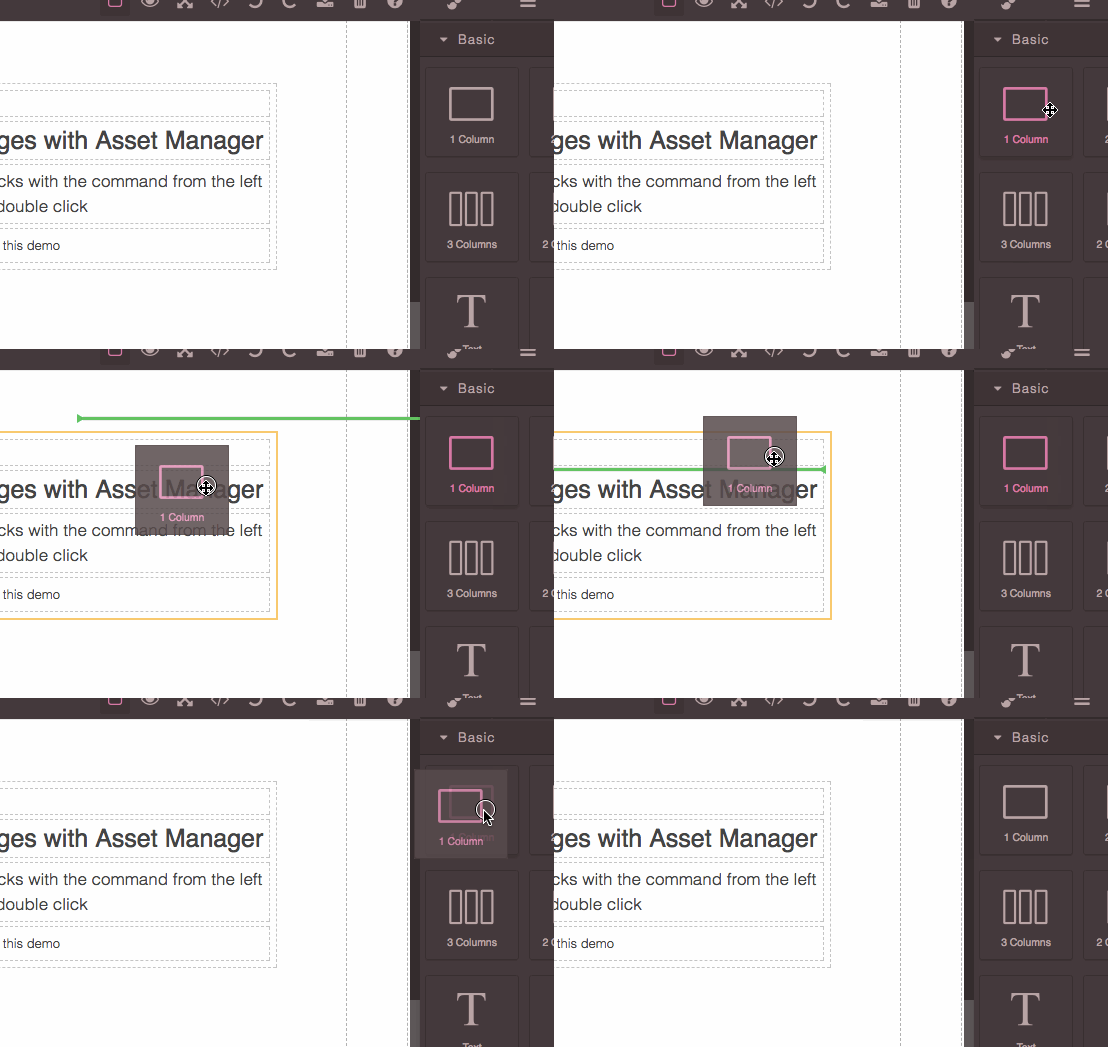
- Drag component to canvas
- Don't release mouse
- Drag back to blocks panel
- Component is still applied to canvas
It should instead cancel
Answers (3)
3. Drag back to blocks panel
Honestly, never seen kind of UX... why not the classic Esc? (which works already)
@Geczy Now blocks support HTML5 D&D https://github.com/artf/grapesjs/releases/tag/v0.13.5
This is a very common UX anywhere you go https://w3c.github.io/html/editing.html#drag-and-dropHowever it is implemented, drag-and-drop operations must have a starting point (e.g., where the mouse was clicked, or the start of the selection or element that was selected for the drag), may have any num...
Related Questions and Answers
Continue research with similar issue discussions.
Issue #2061
How to place a component at the end of the canvas.
How can I put my footer at the end of the canvas? I want the editor to not allow placing a block/widget below the footer. example
Issue #694
CSS Zoom property is not managed by canvas
Hello, I've applied a CSS property on the wrapper as follow When I place my mouse on a component, the tools position are not correct and I'...
Issue #828
Components 'add' event fires different number of times
Hi, I've noticed that if I add the following code in my custom component the event fires differently depending on whether a new child compo...
Issue #1153
Create minimalist Panel left sidebar
Hi grapesjs Team Is it possible to create a quick access left panel sidebar with the most popular blocks(text,image,2column,etc), this way...
Paid Plugins That Match This Issue
Curated by issue keywords and label relevance to help you ship faster.
Loading paid plugin recommendations...
Check the open-source GrapesJS plugins on GitHub or run a quick search in our free catalog.
Browse free plugins →Premium plugins ship with support, regular updates, and production-ready features — save days of integration work.
Browse premium plugins →Related tutorials
In-depth guides on the same topic.
Browse Plugin Categories
Jump directly to plugin category pages on the marketplace.