Strange behavior when trying to change color of buttons and texts
Thanks for reporting this, @ronaldohoch. Great question about Strange behavior when trying to change color of buttons and texts. The recommended approach with StyleManager is to use the event-driven API. Start here: Check the GrapesJS documentation for your specific module Look for the on() event listener method Most...
Read full answer below ↓Question
GrapesJS version
- I confirm to use the latest version of GrapesJS
What browser are you using?
Brave last version
Reproducible demo link
https://jsfiddle.net/qsd9zjrc/
Describe the bug
How to reproduce the bug?
- Open the link (https://jsfiddle.net/qsd9zjrc/)
- Try to change text color
- Try to change green button color by click in it and go to Typography
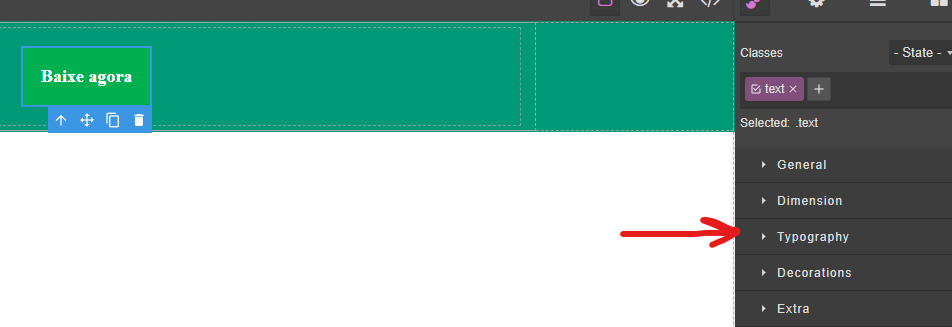
- You will notice that color has a
!importantin it. 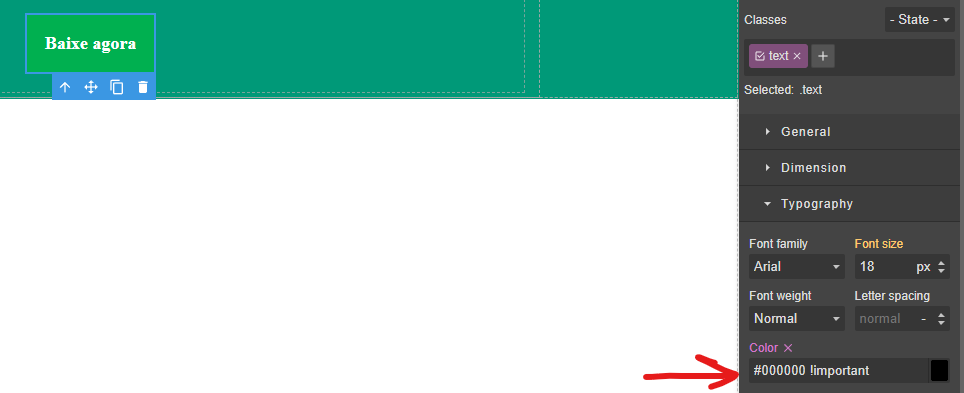
- Also, when you try to change the color, it always keep going back to the previews color with
!importanton it.
What is the expected behavior? Make the StyleManager not use the !important on elements or have a flag for the StyleManager not to use it.
What is the current behavior? GrapesJs is putting !important in css rules
If is necessary to execute some code in order to reproduce the bug, paste it here below: This code is in jsfiddle, the html and styles were generated by our tool created to convert templates with old patterns to be interpreted by GrapesJs.
editor.setComponents(`  <div din_editor_version="2.0.0" class="body">
    <div draggable="true" data-highlightable="1" class="gjs-row" id="ig50u">
      <div draggable="true" data-highlightable="1" class="gjs-cell not-flex-grow" id="iieji">
        <div id="ic9nr">
          <p id="isd7g">
            <a background-color="#00B050" margin-horizontal="20" margin-vertical="20" padding-horizontal-botao="20" padding-vertical-botao="20" border-radius="0" class="text" id="idr7f"><b>
              Baixe agora
              </b></a>
          </p>
        </div>
      </div>
    </div>
    <div draggable="true" data-highlightable="1" class="gjs-row" id="i1sf4">
    </div>
  </div><style>.text{
  color:#d31f1f !important;
}
#ig50u{
  background-color:rgb(0, 153, 120);
  background-size:cover;
  background-position:center top;
}
#iieji{
  margin:0 auto;
  width:900px;
}
#ic9nr{
  padding:5px 15px;
}
#isd7g{
  padding:0px;
  text-align:center;
  margin:0 auto;
}
#idr7f{
  display:inline-block;
  border-style:solid;
  border-width:0px;
  border-radius:0px;
  font-size:18px;
  padding:20px;
  margin:20px;
  text-align:center;
  background-color:rgb(0, 176, 80);
  border-color:transparent;
  text-decoration:none !important;
  color:rgb(255, 255, 255) !important;
}
#ix52f{
  font-size:20px;
}
#i1sf4{
  background-color:rgb(209, 209, 209);
}
</style>`)
Code of Conduct
- I agree to follow this project's Code of Conduct
Answers (1)
Thanks for reporting this, @ronaldohoch.
Great question about Strange behavior when trying to change color of buttons and texts. The recommended approach with StyleManager is to use the event-driven API.
Start here:
- Check the GrapesJS documentation for your specific module
- Look for the
on()event listener method - Most operations can be achieved by listening to editor and component events
Common patterns:
// Listen for changes
editor.on('change', () => console.log('something changed'));

// Component lifecycle
editor.on('component:mount', (c) => console.log('component ready', c));
editor.on('component:update', (c) => console.log('component updated', c));
If you're still stuck:
- Share a minimal CodeSandbox reproduction
- Include what you've already tried
- Mention your GrapesJS version
- The community is here to help!
Related Questions and Answers
Continue research with similar issue discussions.
Issue #6527
Malformed inline styles causing editor freeze
GrapesJS version [x] I confirm to use the latest version of GrapesJS What browser are you using? Firefox 138.0.4 Reproducible demo link htt...
Issue #4897
component:styleUpdate / component:styleUpdate:propertyName not fired
GrapesJS version [X] I confirm to use the latest version of GrapesJS What browser are you using? Edge 109.0.1518.70 Reproducible demo link...
Issue #4601
update() of custom types added to StyleManager is no more triggered when switching between some targets.
GrapesJS version [X] I confirm to use the latest version of GrapesJS What browser are you using? Chromium 104 Reproducible demo link https:...
Issue #4191
We are trying to store the data from grapesJS editor in Angular 10 application, getting CORS error, image attached below
GrapesJS version [x] I confirm to use the latest version of GrapesJS What browser are you using? Chrome 99.0.4844.5 Reproducible demo link...
Paid Plugins That Match This Issue
Curated by issue keywords and label relevance to help you ship faster.
Loading paid plugin recommendations...
Check the open-source GrapesJS plugins on GitHub or run a quick search in our free catalog.
Browse free plugins →Premium plugins ship with support, regular updates, and production-ready features — save days of integration work.
Browse premium plugins →Browse Plugin Categories
Jump directly to plugin category pages on the marketplace.