Collapsed Category in Blocks when Grapes Editor is loaded
Question
Hello, I want all the categories listed in Blocks, must be initially in collapsed condition when the Grapes JS Editor is loaded. How can I do that? Also, if any one category is clicked, all others gets closed just like accordion. Is this possible?
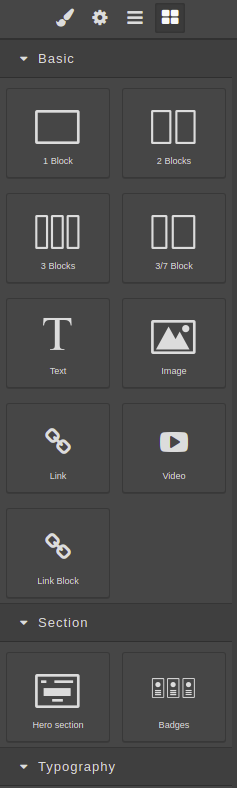
Thanks!
Answers (3)
Try with this
Wow man, Thanks a lot!
Sneak Peak:
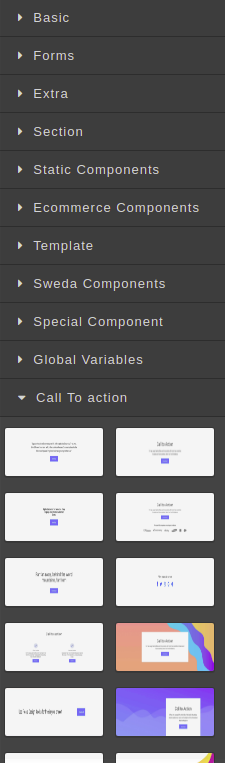 :heart_eyes:
Give your custom class and set styles with the background image Eg Code: In bm.add block and in CSS
Related Questions and Answers
Continue research with similar issue discussions.
Issue #1294
How to add category for default block manager?
@artf I want put all default blocks to category named "Basic". But I can't find any documents about it. I use editor.BlockManager.getAll()....
Issue #1322
Disable editing in Preview Mode.
@artf How can we disable editing in the preview mode and re-enable it when preview mode off. I want to remove editor and hide toolbar in th...
Issue #1780
How to change extra dropdown for link change trait
Hello @artf , I want to give one more functionality to user like user can change any link with default links drop down. In above image i wa...
Issue #966
How to load external CSS file into Grapes Editor?
Hey, During my editor = grapesjs.init(), I want to load an external CSS file into the canvas using @import url(...). So when I use my custo...
Paid Plugins That Match This Issue
Curated by issue keywords and label relevance to help you ship faster.
Loading paid plugin recommendations...
Check the open-source GrapesJS plugins on GitHub or run a quick search in our free catalog.
Browse free plugins →Premium plugins ship with support, regular updates, and production-ready features — save days of integration work.
Browse premium plugins →Related tutorials
In-depth guides on the same topic.
Browse Plugin Categories
Jump directly to plugin category pages on the marketplace.