Default properties not selected in styleManager
Try to check your configuration for the styleManager https://github.com/artf/grapesjs/blob/dev/src/style_manager/config/config.js (highlightChanged should be true)
Read full answer below ↓Question
Hello dear, can you know why default properties is not selected in style manager ??
What event can I trigger to update this ??
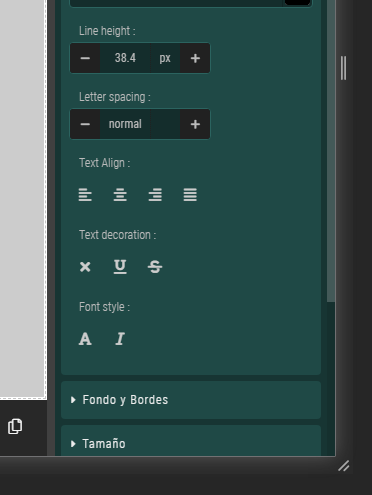
Answers (2)
Try to check your configuration for the styleManager https://github.com/artf/grapesjs/blob/dev/src/style_manager/config/config.js (highlightChanged should be true)
Thanks for reporting this, @alemenciones. Great question about Default properties not selected in styleManager. The recommended approach with StyleManager is to use the event-driven API. Start here: Check the GrapesJS documentation for your specific module Look for the on() event listener method Mo...
Related Questions and Answers
Continue research with similar issue discussions.
Issue #3408
How to changes styles of devices, view code and fullscreen
Currently we have this GrapesJs style: But, we are looking to have this GrapesJs style: My questions are: 1- - how we can change the format...
Issue #3389
MultiSelect some elements and change styles only work on the last selected element
Hi, when I MultiSelect some elements using shift, and change style in styleManager. Only the last clicked element will update the style. Ca...
Issue #3606
If I use float from alignment float not clear that's why design issue occur.
Hello @artf , There a generic issue when try to create a layout using float form alignment. The issue is float not clear automatically. how...
Issue #3600
Event listener to visibility(eye) icon in the Layer Manager
I would like to listen to the eye icon in the layer manager from the editor, based on which, I need to write the custom styles. Is there an...
Paid Plugins That Match This Issue
Curated by issue keywords and label relevance to help you ship faster.
Loading paid plugin recommendations...
Check the open-source GrapesJS plugins on GitHub or run a quick search in our free catalog.
Browse free plugins →Premium plugins ship with support, regular updates, and production-ready features — save days of integration work.
Browse premium plugins →Browse Plugin Categories
Jump directly to plugin category pages on the marketplace.