Position of selector manager.
As you can see from the example Both of them append the element inside the same container. You can simply create different containers
Read full answer below ↓Question
Hi, @artf. I was going through the getting started guide and the selector manager is placed below the style manager.
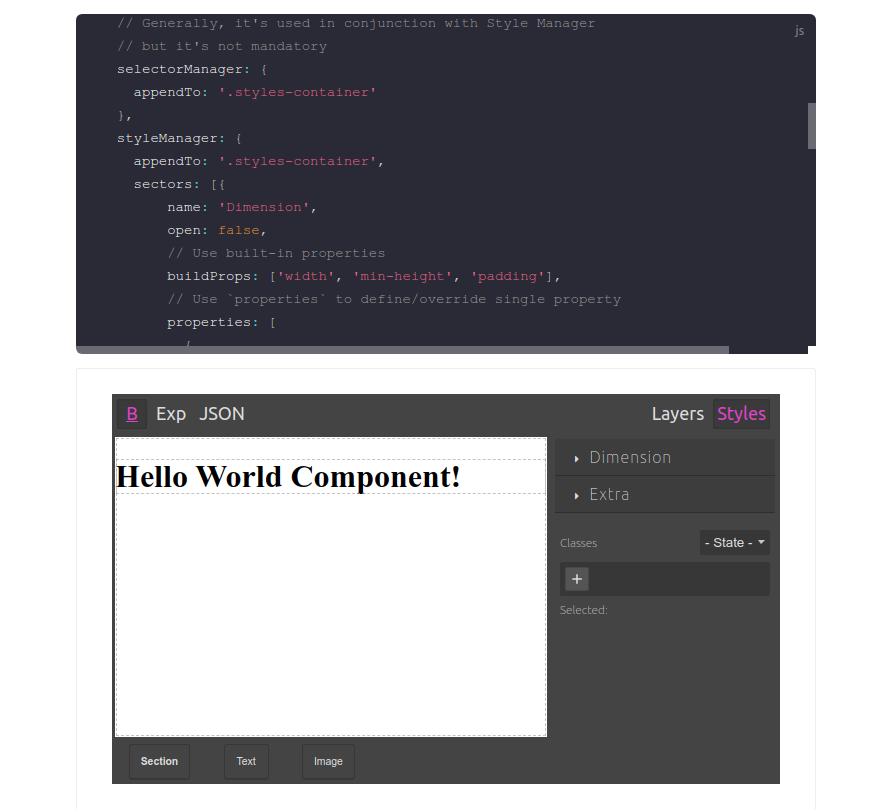
How do I position the selector manager above the styles manager?
Answers (2)
As you can see from the example Both of them append the element inside the same container. You can simply create different containers
Thanks for reporting this, @theSC0RP. Great question about Position of selector manager.. The recommended approach with ProseMirror is to use the event-driven API. Start here: Check the GrapesJS documentation for your specific module Look for the on() event listener method Most operations can be ac...
Related Questions and Answers
Continue research with similar issue discussions.
Issue #5746
ColorPicker Offset incorrect when Panels are outside of Editor Container
GrapesJS version [X] I confirm to use the latest version of GrapesJS What browser are you using? Chrome v122 Reproducible demo link https:/...
Issue #6458
Sector.setName doesn't work
GrapesJS version [x] I confirm to use the latest version of GrapesJS What browser are you using? Chrome Reproducible demo link https://jsfi...
Issue #6365
Style Manager Fails to Interpret Descendant Selectors Correctly
GrapesJS version [X] I confirm to use the latest version of GrapesJS What browser are you using? Chrome Version 131.0.6778.205 Reproducible...
Issue #3599
@keyframes not adding even after i pass the the keyframes object
Hi @artf, I have added the let cc = editor.CssComposer; cc.setRule('.fadetop-animate', { opacity: 0, 'animation-name': 'fadeTop' }, { atRul...
Paid Plugins That Match This Issue
Curated by issue keywords and label relevance to help you ship faster.
Loading paid plugin recommendations...
Check the open-source GrapesJS plugins on GitHub or run a quick search in our free catalog.
Browse free plugins →Premium plugins ship with support, regular updates, and production-ready features — save days of integration work.
Browse premium plugins →Browse Plugin Categories
Jump directly to plugin category pages on the marketplace.