Changing the font inside top panel is disturbing the font-awesome icons
Hi @jayeshmotwani ! Font Awesome relies on the font-family attribute for its icons, & since your selector also targets these icons in addition to the text, Font Awesome's font-family gets overridden by yours, which breaks its icons. I'd recommend using a different selector that would only target the text you're intere...
Read full answer below ↓Question
Hello, I am using Montserrat google font. Ater trying so many things, finally I was able to set the font using following way:
.gjs-pn-buttons > span{ font-family: "Montserrat", sans-serif; }
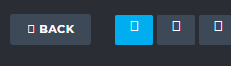
But when I do this, the font is changed but the font-awesome icons are not working.
Please refer the following screenshot for more details. This is how it looks after I changed the font.
Thanks for your help.
Answers (2)
Hi @jayeshmotwani ! Font Awesome relies on the font-family attribute for its icons, & since your selector also targets these icons in addition to the text, Font Awesome's font-family gets overridden by yours, which breaks its icons. I'd recommend using a different selector that would only target th...
@mcottret Thanks for your reply.
I fixed this by adding the label text inside a tag and given my custom font to that particular tag only, instead of entire <span> of button.
Cheers!
Related Questions and Answers
Continue research with similar issue discussions.
Issue #2951
Typography sector not found
When using trying to add a font to the style manager, I use the following code: const prop = editor.StyleManager.getProperty('typography',...
Issue #2014
Not able to get content of a link block
Hello all, I am using grapesjs version 0.14.52. I am having the following issue: When I drop a link block inside the canvas, I can use the...
Issue #2013
Not able to get content of a link block
Hello all, I am using grapesjs version 0.14.52. I am having the following issue: When I drop a link block inside the canvas, I can use the...
Issue #4083
Set root does not work
GrapesJS version[X] I confirm to use the latest version of GrapesJSWhat browser are you using? Safari 15.0Reproducible demo link https://js...
Paid Plugins That Match This Issue
Curated by issue keywords and label relevance to help you ship faster.
Loading paid plugin recommendations...
Check the open-source GrapesJS plugins on GitHub or run a quick search in our free catalog.
Browse free plugins →Premium plugins ship with support, regular updates, and production-ready features — save days of integration work.
Browse premium plugins →Browse Plugin Categories
Jump directly to plugin category pages on the marketplace.