Text shadow disappears on doubleclick
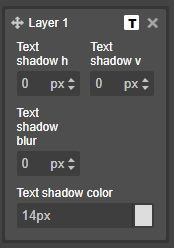
Edit: The Text Shadow does not disappear. The shadow color is set to the shadow blur, and shadow blur gets 0.
Read full answer below ↓Question
Hello. I have a problem, that the text shadow on text element disappears when I doubleclick the element. What should I do?
Here is my code: https://pastebin.berkearas.de/?e1c4c8db9a70894f#DCUHVHZzyhFTnAk2RoJ9faQxQPvAqWMoiBqXHMEzRH5G
Answers (3)
Edit: The Text Shadow does not disappear. The shadow color is set to the shadow blur, and shadow blur gets 0.
I can't reproduce it on the main demo so I'd need also a live demo of your case
Related Questions and Answers
Continue research with similar issue discussions.
Issue #2841
Cannot use 'delete key' on keyboard when editing text.
Hello. I have a problem, that I can edit text, but I cant use the delete key on keyboard. Here is my code: https://pastebin.berkearas.de/?e...
Issue #1109
Column blocks not droppable in canvas
Morning @artf :) I'm experiencing an similar problem to this issue. I can't drop any block (text, image, etc.) inside the column block from...
Issue #1186
Number trait returns 'undefined'
Hello, it's either a bug or a question, i don't know yet. I defined a new component with - beside others - a number trait, as you can see o...
Issue #3063
Block Highlight Display Bug
Version: 0.6.18 You can get the version by typing grapesjs.version into the console Are you able to reproduce the bug from the demo? [ ] Ye...
Paid Plugins That Match This Issue
Curated by issue keywords and label relevance to help you ship faster.
Loading paid plugin recommendations...
Check the open-source GrapesJS plugins on GitHub or run a quick search in our free catalog.
Browse free plugins →Premium plugins ship with support, regular updates, and production-ready features — save days of integration work.
Browse premium plugins →Browse Plugin Categories
Jump directly to plugin category pages on the marketplace.