Move components with same class?
No, classes are made for sharing styles and not the structure
Read full answer below ↓Question
Hello!
Is there any way to change position of all components with the same class?
For example, I have two divs with class name 'title' and 'location'. And there are several other components with the same class names:
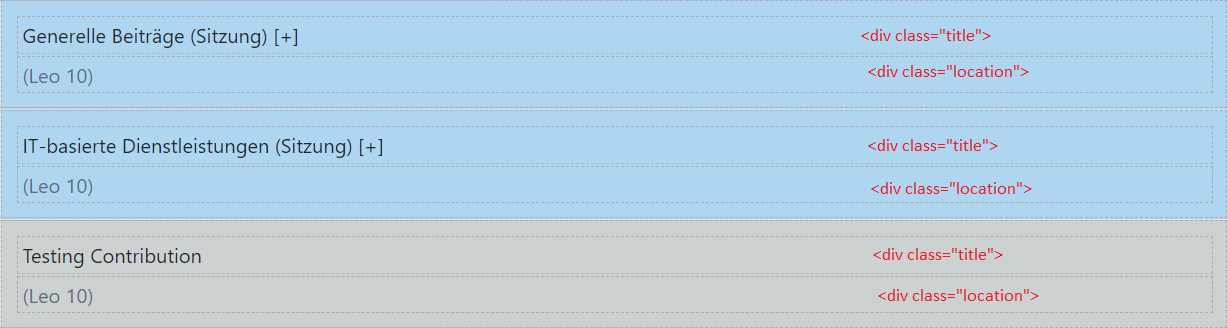
When I drag the component with class name 'title' and drop it below 'location', all the other components should be updated likewise. How can I do so?
Answers (1)
No, classes are made for sharing styles and not the structure
Related Questions and Answers
Continue research with similar issue discussions.
Issue #1841
Components name
I have two questions.Is there any way to change the built-in components name? I wanted to change the name "Box" to "Div". so the same name...
Issue #1608
Customize CSS class name
GrapesJs editor creates a unique class for element and adds CSS rules to it. For example, Now, is there any way to customize this behaviour...
Issue #1336
Can I make everything unselectable by default?
Currently all components are selectable/hoverable by default. And if you want you can change that behavior by providing data-gjs-hoverable=...
Issue #3231
How to change gjs-ckeditor-format component
hi guys, we all know that gjs-ckeditor-plugin working with [data-gjs-type]="text" components. I wanna know , could we change this option? I...
Paid Plugins That Match This Issue
Curated by issue keywords and label relevance to help you ship faster.
Loading paid plugin recommendations...
Check the open-source GrapesJS plugins on GitHub or run a quick search in our free catalog.
Browse free plugins →Premium plugins ship with support, regular updates, and production-ready features — save days of integration work.
Browse premium plugins →Related tutorials
In-depth guides on the same topic.
Tutorial
Introducing Search on GJS.Market
GJS.Market now has one search across everything we publish — plugins, articles, community questions, guides, authors and services. Press ⌘K from any page.
Tutorial
GJS.Market Is Now Available for India 🇮🇳
GJS.Market is expanding its global presence with a dedicated experience for developers, agencies, SaaS companies, and digital creators in India
Tutorial
How to Build an AI-Powered Page Builder with GrapesJS in 2026
What we learned building GJSDocs — from simple AI text generation to structured, context-aware visual editing
Browse Plugin Categories
Jump directly to plugin category pages on the marketplace.