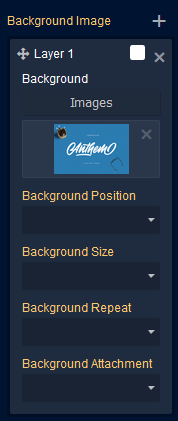
Can someone explain property.layers of the style manager? [pls read description]
@alikabeer32 if the background property doesn't work probably the order of inner properties is wrong. Check the syntax here: https://developer.mozilla.org/en-US/docs/Web/CSS/background#Syntax
Read full answer below ↓Question
I would like to code the entire background layers property but this time using 'background' instead of background-image so it doesn't mess up the gradient but unfortunately can't bring background-position, background-size, etc to work. but the result is something like this -> background: url(../assets/347f05a7ef54b27632187b38a1ddfe65) left top repeat; }
Answers (3)
@alikabeer32 if the background property doesn't work probably the order of inner properties is wrong. Check the syntax here: https://developer.mozilla.org/en-US/docs/Web/CSS/background#Syntax
@artf It did work. Now I corrected the order ->
background: url(../assets/05efe94654acb49683023f16e5cefce7) left center / cover no-repeat fixed;
But when I deselect and select the component again, those values ( left center / cover no-repeat fixed) appear empty in the style manager panel.
Related Questions and Answers
Continue research with similar issue discussions.
Issue #2138
Gradient plugin is interfering with background-image
The background-image url is getting wrapper around by linear-gradient() function like so Even though I assigned gradient to 'background' pr...
Issue #3335
Creating trait with Style Manager property UI
I have a component using the background-url Style Manager property: I would like to reuse this UI that is shown in the Style Manager for a...
Issue #2026
Style manager css functions (for example transform: rotate(90deg)) accepts only one parameter
I would like to provide an option for the css function translate(x,y) but the addProperty parameter functionName accepts only one parameter...
Issue #3255
Custom Style Manager
Hi @artf I am trying to change the type and input values of display property like this way -: But on style-manager Button are not visible....
Paid Plugins That Match This Issue
Curated by issue keywords and label relevance to help you ship faster.
Loading paid plugin recommendations...
Check the open-source GrapesJS plugins on GitHub or run a quick search in our free catalog.
Browse free plugins →Premium plugins ship with support, regular updates, and production-ready features — save days of integration work.
Browse premium plugins →Browse Plugin Categories
Jump directly to plugin category pages on the marketplace.