Flexbox column is not working correctly.
This is how the flexbox is supposed to work when you resize a middle column. What you're trying to achieve is a bit different and would require another kind of implementation, so I'd suggest to create your grid components
Read full answer below ↓Question
Hi @artf ,
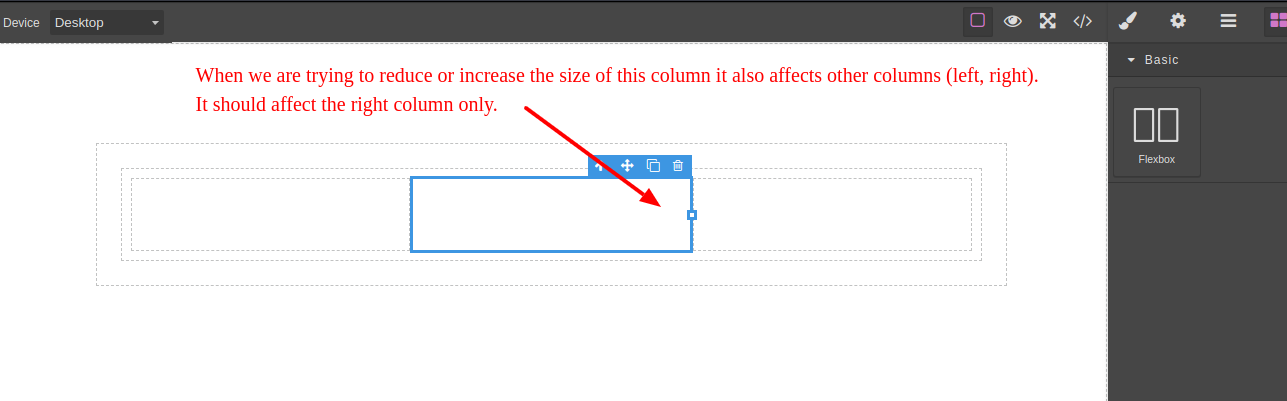
We are using flexbox block. The problem is, when we are trying to resize the middle column it affects all other columns, like automatically reducing the width of left column. It should affect the right column only.
To create this scenario please add three columns and try to resize the middle one (https://codepen.io/sanjib00/pen/wOpVNv).
Can you give some hints how can we solve this problem?
Answers (2)
This is how the flexbox is supposed to work when you resize a middle column. What you're trying to achieve is a bit different and would require another kind of implementation, so I'd suggest to create your grid components
This thread has been automatically locked since there has not been any recent activity after it was closed. Please open a new issue for related bugs.
Related Questions and Answers
Continue research with similar issue discussions.
Issue #452
Custom Resizer issue (or maybe how I'm saving/loading components)
I'm trying to build a custom resizer for one of my components. It's a grid/column layout based on Flexbox and I want users to be able to re...
Issue #1921
Image/Video resizing - Not working from all the sides
Hi @artf , I am trying to resize the image/Video, When I drag in/out from the right side it is working fine but when I drag it using left s...
Issue #1179
Cannot load styles saved as !important
Hi! I'm trying to make all the user-set styles have the "!important" flag, in order to prevent some other previous existent classes to over...
Issue #1850
How to show blocks under different tabs
Hello @artf , Hope you are doing fine. I was trying to show all the blocks under different tabs. For example: displaying sections, columns...
Paid Plugins That Match This Issue
Curated by issue keywords and label relevance to help you ship faster.
Loading paid plugin recommendations...
Check the open-source GrapesJS plugins on GitHub or run a quick search in our free catalog.
Browse free plugins →Premium plugins ship with support, regular updates, and production-ready features — save days of integration work.
Browse premium plugins →Related tutorials
In-depth guides on the same topic.
Browse Plugin Categories
Jump directly to plugin category pages on the marketplace.