How to add extra field in input traits
In the docs, there is exactly an explanation about what you are looking for. Take a look here: https://grapesjs.com/docs/modules/Traits.html#add-traits-to-components
Read full answer below ↓Question
Hi, I want to add the new field in default input traits. for example:- i need to add {label: binding, name:binding} in already exist input traits
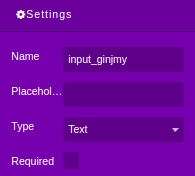
in the above image. i need to add the new field in between of name and placeholder.
can anyone please help me
Thanks in Advance
Answers (3)
In the docs, there is exactly an explanation about what you are looking for.
Take a look here: https://grapesjs.com/docs/modules/Traits.html#add-traits-to-components
I did this by using
 this.editor.DomComponents.getType('input').model
            .prototype.defaults.traits.push({
                type: 'text',
                label: binding,
                name:binding

            });
and its working fine
This thread has been automatically locked since there has not been any recent activity after it was closed. Please open a new issue for related bugs.
Related Questions and Answers
Continue research with similar issue discussions.
Issue #1294
How to add category for default block manager?
@artf I want put all default blocks to category named "Basic". But I can't find any documents about it. I use editor.BlockManager.getAll()....
Issue #1723
Replacing particular text in dropped component
Hi, I get the value from custom traits from what I entered but I don't know how to change the particular value in dropped component and ren...
Issue #508
If you add a checkbox trait, it does not render correctly in the settings panel unless there is also a text trait
A text trait and a checkbox: Results in: If checkbox only: The checkbox overlaps the label:
Issue #995
How to add fields on trait dynamically
I am building the trait when the application starts. so getting the below fields at side bar as settings Now I want more field to be loaded...
Paid Plugins That Match This Issue
Curated by issue keywords and label relevance to help you ship faster.
Loading paid plugin recommendations...
Check the open-source GrapesJS plugins on GitHub or run a quick search in our free catalog.
Browse free plugins →Premium plugins ship with support, regular updates, and production-ready features — save days of integration work.
Browse premium plugins →Related tutorials
In-depth guides on the same topic.
Browse Plugin Categories
Jump directly to plugin category pages on the marketplace.