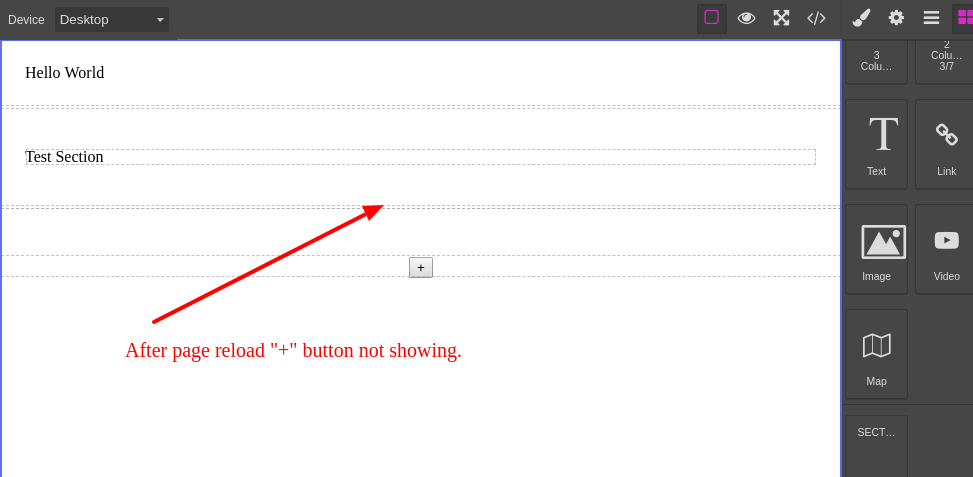
After page reload plus ("+") button not showing.
@sanjib00 when you render fromElement, it's a content, not component. e.g. "\<section\>" html tag would not automatically get recognize as component because you don't have any code to recognize it as so. (hint: isComponent function or data-gjs-type attribute)
Read full answer below ↓Question
Hi @artf ,
When I drag the section block, a plus button is displaying. After save and reloading the page, "+" button not showing. I need to show the button after page reload also. Please suggest me, how can I solve this problem?
Please check the jsfiddle, similar scenario created.
Answers (3)
@sanjib00 when you render fromElement, it's a content, not component. e.g. "<section>" html tag would not automatically get recognize as component because you don't have any code to recognize it as so. (hint: isComponent function or data-gjs-type attribute)
@sanjib00 probably you're loading incorrectly your template data https://grapesjs.com/docs/modules/Storage.html#store-and-load-templates
This thread has been automatically locked since there has not been any recent activity after it was closed. Please open a new issue for related bugs.
Related Questions and Answers
Continue research with similar issue discussions.
Issue #1827
How to add a button in the section (block) on hover?
Hello @artf, You are doing great work. I tried to add a button in the section (block) on mouseover. Can you please help me to add or show "...
Issue #1789
How to append a plus icon in the column and element section?
Hi @artf . First of all, great work. I have been trying to use grapesjs for a month now. So, I stumbled upon a situation where I need to le...
Issue #1479
Custom element with pop-up
hello @artf I've make pop-up for select custom link data but data is save and also display when we click on export html. But data is not re...
Issue #1720
How to add the button in custom traits
Hi, I try to add a button to my custom traits for my custom blocks but its not working fine as expected and also need to know how to call t...
Paid Plugins That Match This Issue
Curated by issue keywords and label relevance to help you ship faster.
Loading paid plugin recommendations...
Check the open-source GrapesJS plugins on GitHub or run a quick search in our free catalog.
Browse free plugins →Premium plugins ship with support, regular updates, and production-ready features — save days of integration work.
Browse premium plugins →Related tutorials
In-depth guides on the same topic.
Browse Plugin Categories
Jump directly to plugin category pages on the marketplace.