Class on different states are not being applied to those states.
I have just checked and can confirm that it also works in your example. First add a class to your component, e.g. .text-blue-on-hoverNext, select the state you want to modify, e.g. hoverNow for instance change the color of the text to blue Result: Every time you hover over your component, the text is turned blue. Side...
Read full answer below ↓Question
I'm trying to apply a class on hover of a component and the class is being applied but not on hover, it applies with normal state.
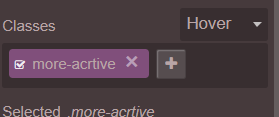
Please let me know if I'm looking into right feature or I misunderstood the feature.
PLNKR : https://plnkr.co/edit/Est6AnnGInBa3yvhzCvm?p=preview
I don't see anything in CSS or HTML itself that state that a particular class should be applied on hover or other states.
Please Help!
Thanks, Taufeek
Answers (3)
I have just checked and can confirm that it also works in your example. First add a class to your component, e.g. .text-blue-on-hoverNext, select the state you want to modify, e.g. hoverNow for instance change the color of the text to blue Result: Every time you hover over your component, the text...
Now I get that, it works perfectly fine, I just didn't know that how it works.
Thanks @NicoEngler for you this fast reply and clearing me out :)
The class is applied regardless of the components state. Based on that, you can select a state, e.g. hover and style your class in that particular state. Effectively the following css will be created if you select the state hover and color your text red. I hope that clears up the confusion.
Related Questions and Answers
Continue research with similar issue discussions.
Issue #392
Define selected class.
Hello @artf , Is there a way to automatically select the class that is created on elements with custom styles. I'm currently trying to dyna...
Issue #1723
Replacing particular text in dropped component
Hi, I get the value from custom traits from what I entered but I don't know how to change the particular value in dropped component and ren...
Issue #408
How to update toolbar of component?
Hi Artf, i was added new command to editable component, update style work well but i don't know how to update this toolbar after component...
Issue #1645
Move panel to the left
Hi grapesjs team, I am trying to move BlockManager, StyleManager, TraitManager etc to the left. I have tried to use appendTo but I don't kn...
Paid Plugins That Match This Issue
Curated by issue keywords and label relevance to help you ship faster.
Loading paid plugin recommendations...
Check the open-source GrapesJS plugins on GitHub or run a quick search in our free catalog.
Browse free plugins →Premium plugins ship with support, regular updates, and production-ready features — save days of integration work.
Browse premium plugins →Related tutorials
In-depth guides on the same topic.
Browse Plugin Categories
Jump directly to plugin category pages on the marketplace.