Wrong Placeholder marker when inserting in column flexbox component
Question
Hello artf,
I have a Problem with the Insertion Placeholder Marker. When you insert a component in a Flexbox-Parent it is always vertical (as normally required). But if you change the flex-direction property to column, the items are sorted vertically, so the Placeholder should be horizontal, as for example block items. But the property has no effect on position or dimension.
Picture, reproduced in latest Demo:
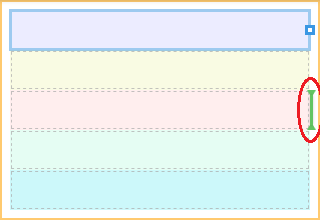
Answers (2)
Thanks @ProfSaputo I'll fix it in the next release
This thread has been automatically locked since there has not been any recent activity after it was closed. Please open a new issue for related bugs.
Related Questions and Answers
Continue research with similar issue discussions.
Issue #1567
Rte toolbar bug
Hello all, I am using the latest grapesjs stable version (40) and I noticed the following bug in the rich text editor: If the user drags an...
Issue #1346
Property slider view default unit
Hey @artf , I think that the slider component would come handy from the UX perspective for the user interaction of some of the integer prop...
Issue #1830
StyleManager properties without "property" defined cause an error on component selection
When using a StyleManager property where "property" is not defined, and defaults to '', I'm seeing an error on component selection: "TypeEr...
Issue #1951
Change or add event on add component from block
is it possible ?, change the drag and drop event to on click when adding a new component, I want to add components by clicking the block th...
Paid Plugins That Match This Issue
Curated by issue keywords and label relevance to help you ship faster.
Loading paid plugin recommendations...
Check the open-source GrapesJS plugins on GitHub or run a quick search in our free catalog.
Browse free plugins →Premium plugins ship with support, regular updates, and production-ready features — save days of integration work.
Browse premium plugins →Related tutorials
In-depth guides on the same topic.
Tutorial
Super Tooltip for GrapesJS — Version 0.1.5 Released 🎉
We’re excited to announce the v 0.1.5 update of Super Tooltip, our floating‑menu and tooltip plugin for GrapesJS
Tutorial
GrapesJS in 2026: The Complete Guide to the Open-Source Web Builder Framework
Master GrapesJS in 2026. Architecture, code examples, React integration, plugin development, Studio SDK, and how it compares to other projects
Browse Plugin Categories
Jump directly to plugin category pages on the marketplace.