External Elements can drag and drop in canvas?
I am working on relative and absolute both will let you know when done.
Read full answer below ↓Question
Hi Artf
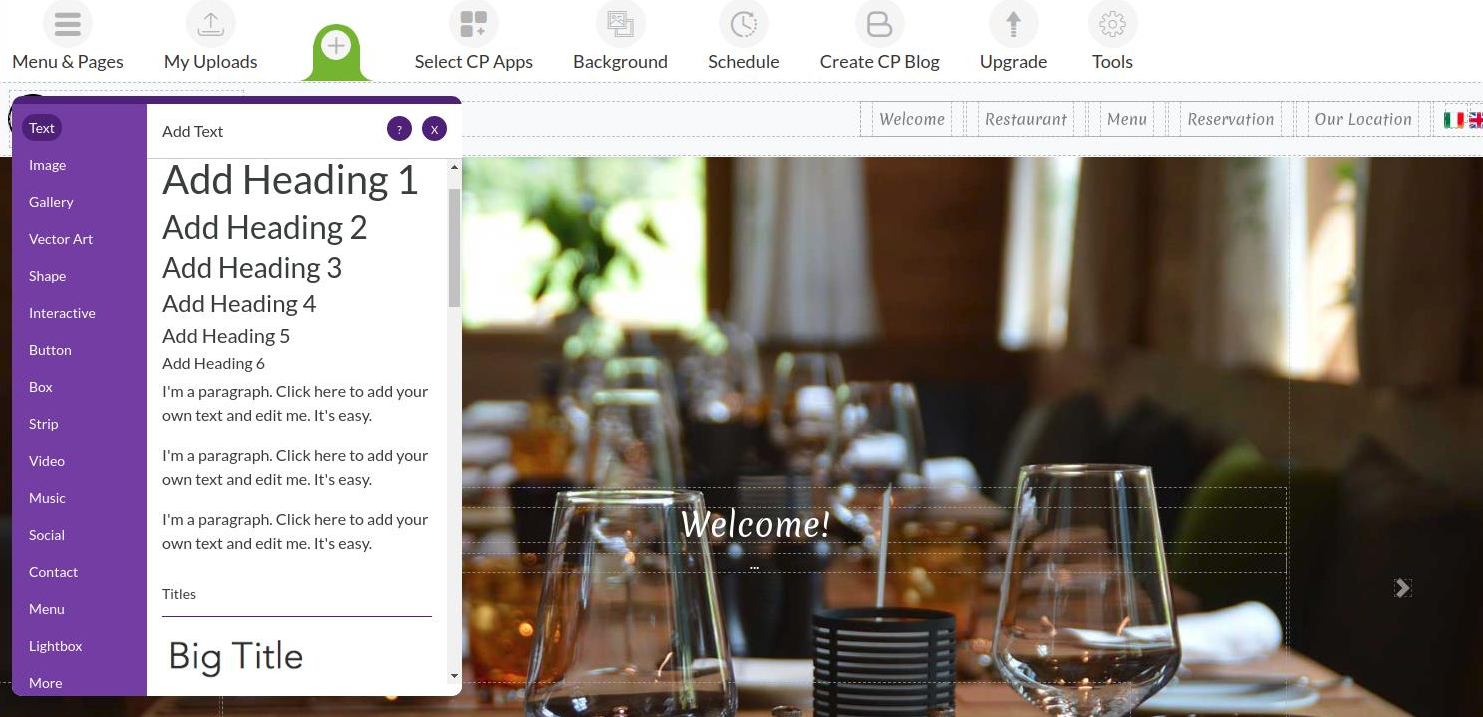
Actually there is no issue. we are using grapesjs in a different way. We are not using header and sidebars of grapesjs we are performing its functionalities buy our own triggers like undo redo preview etc. Is there any way i can add my own component panel having headings, images, Gallery, Videos, Vectors, Shapes etc and drag and drop own elements in GrapesJs canvas?
Answers (3)
I am working on relative and absolute both will let you know when done.
Hi Umar, GrapesJS supports native HTML5 Drag&Drop, therefore you are able to drop ANY kind of draggable resources (not only from the browser) You can also extend it's capabilities by using canvas:* events, like canvas:dragdata which allows you to define what Components to use on specific dataTransf...
Hi Artf, Thanks for help i got that and using drag and drop in the same way. you have done the great job (Y). BTW what about designer mode is that available?
Related Questions and Answers
Continue research with similar issue discussions.
Issue #1527
How to add countdown/navigation event in undo/redo
Hello @artf, How can we add any changes/events in undo/redo Manager like when we drag element like navigation or countdown. Hope for positi...
Issue #1176
Style Sectors
hi @artf is there any way to setup style sectors for different devices mobile and desktop i want to disable style sectors in Desktop if sty...
Issue #1307
To stop dynamically generated classes in grapes Editor
Hi @artf is there any Way to stop dynamically generating classes on reloading editor. let say when i add my custom class i.e "my_class" to...
Issue #1607
Load 2 canvas
Is there any way to load 2 page canvas with single sidebar drag and drop functionality.?
Paid Plugins That Match This Issue
Curated by issue keywords and label relevance to help you ship faster.
Loading paid plugin recommendations...
Check the open-source GrapesJS plugins on GitHub or run a quick search in our free catalog.
Browse free plugins →Premium plugins ship with support, regular updates, and production-ready features — save days of integration work.
Browse premium plugins →Related tutorials
In-depth guides on the same topic.
Browse Plugin Categories
Jump directly to plugin category pages on the marketplace.