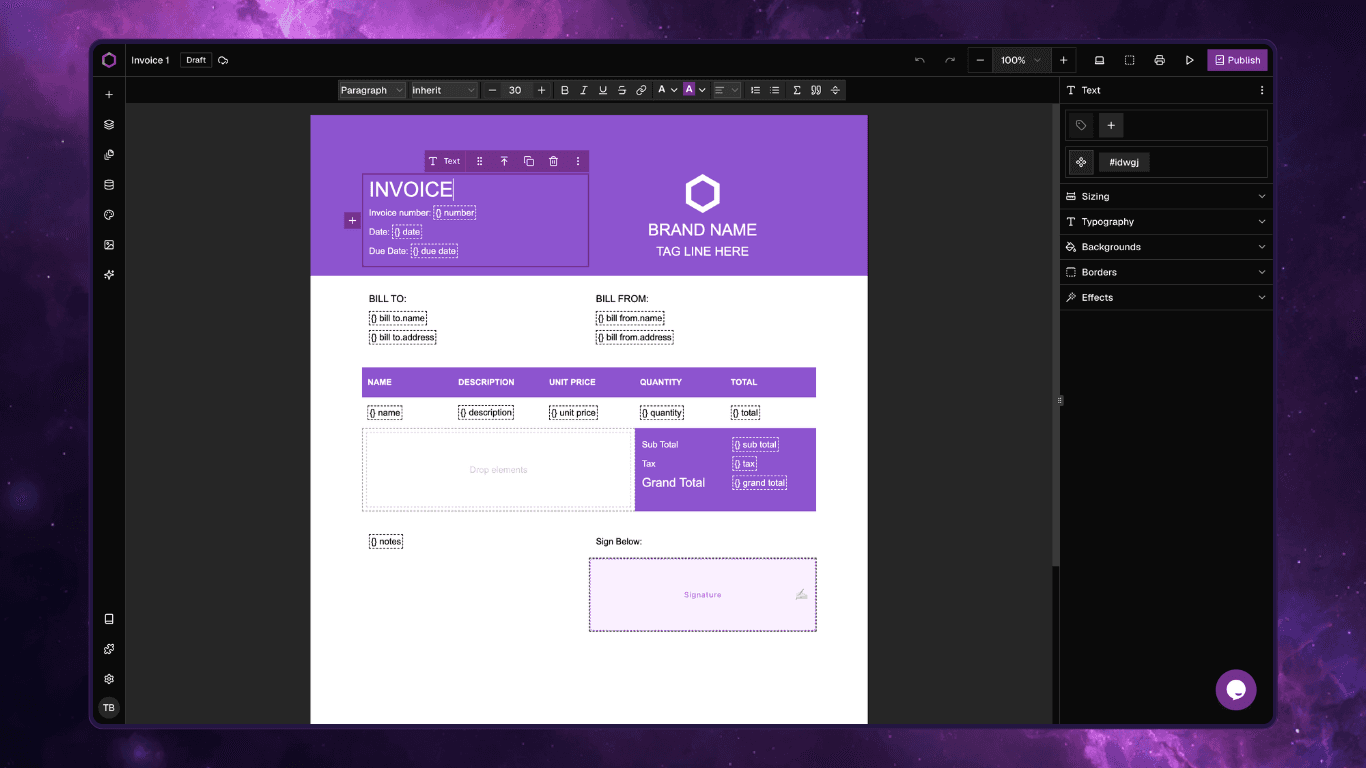

Every developer building a visual content or template builder faces the same daunting crossroads: Do we build the core editor infrastructure from scratch, or do we stand on the shoulders of giants? When building Composeit, a next-generation template builder designed for precision PDF generation, we chose the latter. By anchoring our stack to grapesjs-shadcn, we bypassed months of tedious baseline development.
Here is a look behind the curtain at exactly what we skipped, where we reinvested our engineering hours, and how it resulted in a faster, more performant application.
What We Didn’t Have to Build (The Out-of-the-Box Wins)
Instead of spending weeks wireframing and debugging foundational UI components, grapesjs-shadcn handed us a robust, production-ready core on day one. We completely skipped the implementation of:
Core Editor UI: Rich Text Editors (RTE) for text manipulation, asset management modals, and layer trees.
Style & Attribute Mechanics: Complex managers for CSS classes, traits, attributes, and global style rules.
Structure & Reusability: Built-in support for blocks, reusable symbols, and multi-page routing.
By taking these heavy architectural lifts off our plate, we didn’t have to reinvent the wheel. Instead, we directed 100% of our energy toward solving the unique, high-value challenges of PDF template generation.
Where We Reinvested Our Time
With the baseline architecture solved, we turned our focus to perfecting the core value proposition of Composeit: absolute layout precision and powerful data integration.
1. Pixel-Perfect Canvas Live Editing
PDFs are notoriously finicky—what you see on a web canvas rarely translates perfectly to a printed page size. We utilized the extra development time to make the live canvas accurate to the final output engine.
Global & Sectional Page Controls: We built an architectural layout system where users can define project-wide page settings, while still allowing independent sections to have varying page sizes and orientations within the same document.
2. High-Performance Datasource & Token Mapping
Building a schema visualizer and an Abstract Syntax Tree (AST) for conditional formatting from scratch is a notorious time-sink, especially when integrating multiple libraries. grapesjs-shadcn features a built-in UI for schema and conditional logic management, built on top of the APIs already provided by grapesjs completely removing the burden of juggling multiple libraries and trying to pass data between them.
More importantly, it gives a massive performance boost:
The Event-Driven Advantage: Instead of relying on heavy React
useEffecthooks to listen to global schema changes (which drags down performance as both the schema and template grow), we hooked directly into GrapesJS's native event emitter.We listen directly to token-specific events, triggering lightweight, isolated live updates only when a precise token changes. This architecture also made binding complex backend data directly to UI traits and styles incredibly straightforward.
Supercharging Complex Logic with EJS
To give our users enterprise-grade control over their documents, we needed to support heavily nested loops and advanced data formatting. We opted to use EJS (Embedded JavaScript templates) as our underlying syntax engine.
While converting data resolvers for collections, conditions, and variables into EJS sounds complex, the structured design of grapesjs data resolvers made it remarkably predictable. Because the data shapes are fixed, mapping them to EJS templates was seamless.
This integration allowed us to ship premium data manipulation features out of the box:
For Variables: Built-in data aggregation and custom formatting.
For Loops: Advanced sorting and granular filtering mechanisms directly within the visual builder.
Smarter Building, Faster Delivery
Choosing the right foundation didn’t just save us time—it allowed us to innovate. With our core infrastructure solid, we even had the bandwidth to design and implement AI-assisted building features to help users generate layouts instantly. (You can read all about our AI integration in our dedicated deep-dive blog post!)
We are incredibly proud of how lean, performant, and powerful Composeit has become, and we want you to experience it firsthand.
Get Started with Composeit
See it in Action: Check out what we’re building at composeit.app.
Grab the Preset: Ready to build your own? Purchase the preset here.
Need Customization? If you need assistance tailoring this setup to your specific workflow, contact us today—we’re happy to help you customize it.